
Summary: There could be nothing more terrifying for TikTok users than getting their TikTok account banned. Well, such a situation arises mostly when users violate the community guidelines issued by TikTok. So, if your account got banned and wondering how to recover banned TikTok Account, reporting the issue to TikTok Customer Support or drafting an email appealing for banned TikTok account recovery can help you resolve the problem.
Well, it is very much frustrating for users to face such a problem because of no reason. So, if you have not infringed any violation but still facing this problem, must go through this complete guide to know the ways on how to recover banned TikTok account.
Why TikTok Account Gets Banned?
Talking about the reasons, there are so many situations and conditions that may get your TikTok account banned permanently. Let’s see some of the major reasons:
- Guidelines Violation: When users violate the community guidelines issued by TikTok, such as posting illegal content, spamming other users, or exceeding the daily following and comments limit.
- 3rd Party Account Monetization: You may also get banned on TikTok if you are trying to monetize your account by using any 3rd party apps without considering the infringement of community guidelines.
- Copyright Policy Violation: As TikTok doesn’t allow you to post any content that violates the copyright policy, if you have posted any such content that another user has the copyright of, then your account will get banned.
- Inappropriate Activities: TikTok algorithms track the number of followers, likes, and comments. If they suspect any sudden change in them, they will consider them as bots and ban the accounts.
- Exceeding Video Posting Limit: There is a high chance that your account will get banned if you’re posting an excessive number of videos within a short period of time. The limit is nine consecutive posts per day.
How To Recover Banned TikTok Account?
1st Way: Report the Problem to TikTok Customer Support
If your TikTok account is permanently banned for no reason, you can recover your banned account by contacting the TikTok Support Team may fix the issue. Whenever an account gets banned, the users receive mail from the TikTok team.
In this situation, either you can wait for the next 24 to 48 hours to get your account restored or contact the support team instantly. I will suggest you contact the team instantly. If you don’t know how to do this, then follow these steps:
- Open the TikTok app on your phone.
- Tap on the profile icon.
- Then, go to Privacy and Settings.
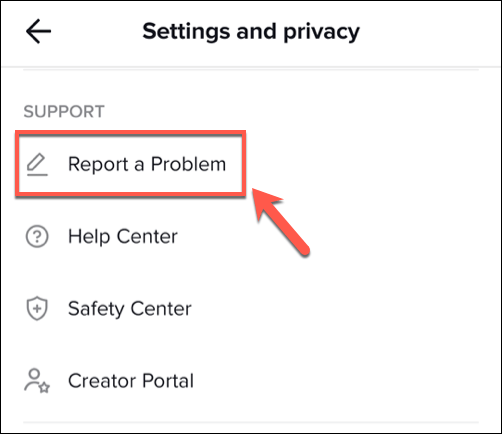
- Now, tap on the Report a Problem option given under the Support section.
- Go to the Account and profile option.
- Select the Profile Page and then tap on the Other.
- Tap on the Still have problem.
- Write down your issues in the box and explain why you believe your account shouldn’t be banned.
- Then tap on the Report button.
2nd Way: Appeal Using Emails
Another way to get back your permanently banned TikTok account is by appealing to the support team via sending emails. There are several email addresses available online that you may use to report your issue.
As the account usually gets banned due to the infringement of policy and guidelines, the best way to deal with the issue is to approach the legal department of TikTok.
Here are some useful email addresses that might be helpful for you – business-servicesupport@tiktok.com, legal@tiktok.com, creators@tiktok.com, info@tiktok.com, privacy@tiktok.com.
While appealing for getting back the banned TikTok account, remember to mention your email address and TikTok account detail.
Also, don’t use harsh language or hateful speech to return your account. Explain your situation and issues to the team in detail and why you think banning your account is unfair to you.
Well, convincing them to return your account is not as easy as it sounds. You can’t send an email only once and expect them to fulfill your wish. You need to make the same appeal every day until you get your banned TikTok account back.
3rd Way: Use Feedback Form
TikTok also allows you to use the feedback form in case of any inconvenience. So, if you want to recover the permanently banned TikTok account, then you may use this form.
To use this form, first, you need to go to the Share your feedback form. This form has been made for TikTok users to share their experience with the TikTok app. However, you can also use this form to report a problem regarding your account.
After opening the feedback form in the browser, you need to do the following:
- Enter the contact details. Here, enter your email address (the same one you used to create the TikTok account) and the TikTok username.
- After providing the contact information, scroll down the form. Now, you will be asked to provide another 3 things which are topic, sub-topic, and the description of the appeal.
- First, go to the Topic dropdown box. Here, select the Account ban/suspension option.

- Next, tap on Tell us more.
- Now, you will get three options, i.e., Banned account (age-related), Livestream, and Banned account (not age-related). Choose the option that best describes your issue.
- Lastly, it’s time to describe your issue with the TikTok account. In the “How can we help box?” describe your situation and plead to remove the ban from your TikTok account.
- Moving to the final step after describing your issue, go to the bottom of the form. Here, you will get an option for Attachments. You can upload up to 10 screenshots. So, if you want to attach the screenshot of the banned message, then upload it here.
- If you have chosen the Banned account (age-related) or Livestream option under the Tell us more section, then you have to upload your photo holding the ID. it is to prove that you are not below the age of 16.
After submitting the feedback form, you need to wait for a few days for the response.
4th Way: Provide Your Age Proof
If your TikTok account has been banned due to age restrictions, then you can always ask the support team to remove the ban by providing age proof.
There are so many TikTok users who fake their age to set up a TikTok account. Since the entered age is incorrect, their accounts get banned. However, sometimes, TikTok misperceives the user’s age and bans the account.
If the same has happened to you, then you can remove the ban by sharing the ID proof with the TikTok team and then asking them to remove the ban.
5th Way: Use a VPN
If you are aware of all the TikTok updates, then you must be knowing that in the past few months, TikTok has been banned in so many countries.
So, if you belong to any of these countries, then you won’t be able to access the TikTok account and may run into the permanently banned message.
It is because your network provider might have blocked the TikTok platform. In this scenario, you need a different approach to get a permanently banned TikTok account back.
Here, nothing could be a better option than using the VPN. VPN will hide the actual IP address and assign the new IP address to any other location of your choice. And, due to this, you will be able to access your TikTok account.
However, not all VPN services are able to do so. For this, you need the best VPN. So, if you are unable to figure out which VPN app will be suitable for you, check our guide on the best VPN apps for Android. Here, you will find a detailed comparison between the best VPN services.
But if you ask me for a suggestion, then I will highly recommend you use ExpressVPN. It has been declared the best VPN for devices. The best part of this VPN is, it lives up to all expectations and provides the best service without affecting the internet speed.
Don’t take my word for it, check reviews of this VPN, and then give it a try.
Frequently Asked Questions:
How to restore TikTok data after banned?
When an account is banned, you will get an email concerning the same from TikTok. In such case, the best thing you can do is either wait until your account gets automatically restored after 24-48 hours or try connecting the customer support and report the issue.
What actions I cannot perform during account suspension?
During TikTok account suspension, you cannot comment, upload a video, message, & edit your profile on TikTok.
What contents does TikTok ban?
Below are some of the content’s kind that TikTok mostly bans:
- Contents threatening public safety.
- Violent contents.
- Sexually explicit content
- Contents promoting illegal activities.
- Misguiding or spam content.
- Contents glorifying or depicting self-harm
Conclusion
So, these are some ways that you can use for TikTok banned account recovery in case banned for no reason.
I hope, the mentioned ways turn out to be helpful for you in getting back your banned TikTok account and that your question on how to recover banned TikTok account gets well answered. If you have any other queries related to the article, feel free to reach us at our official Facebook or Twitter page.

James Leak is a technology expert and lives in New York. Previously, he was working on Symbian OS and was trying to solve many issues related to it. From childhood, he was very much interested in technology field and loves to write blogs related to Android and other OS. So he maintained that and currently, James is working for androiddata-recovery.com where he contribute several articles about errors/issues or data loss situation related to Android. He keeps daily updates on news or rumors or what is happening in this new technology world. Apart from blogging, he loves to travel, play games and reading books.