
Recently, many Samsung users have experienced and reported a phone overheating problem due to heavy processing. Additionally, background apps consume resources silently. However, overheating can affect device speed, comfort, and battery health. Luckily, you can fix this issue with proven methods. In this post, you will learn how to stop Samsung phone from overheating, along with the major factors
So, let’s follow the steps below to keep your Samsung phone cool and stable.
To fix Android-related issues, we recommend this tool:
This effective tool can fix Android issues such as boot loop, black screen, bricked Android, etc. in no time. Just follow these 3 easy steps:
- Download this Android System Repair tool (for PC only) rated Excellent on Trustpilot.
- Launch the program and select brand, name, model, country/region, and carrier & click Next.
- Follow the on-screen instructions & wait for repair process to complete.
Why Is My Samsung Phone Hot?
Phone overheating is mainly caused by several reasons, including:
- Running too many apps in the background consumes resources.
- Extended gaming sessions.
- Cached data & partition.
- Outdated OS.
- Poor ventilation traps heat inside the device.
So, these are common causes behind the problem. Now, let’s proceed to know the Samsung phone overheating fixes.
How to Stop Samsung Phone from Overheating?
Let’s follow the step-by-step methods to get rid of the problem.
Method 1- Close Unused Applications
Many applications stay active after closing the screen. Sometimes, they may cause device performance issues or use CPU power continuously. Therefore, check and ensure no unused app running in the background. As a result, your phone cools faster and performs better.
Also Read: How to Fix Samsung Screen Flickering Issue in 7 Easy Ways?
Method 2- Reduce Screen Brightness
If your mobile’s brightness is set to high, it can generate extra heat quickly. All you need to do is to decrease the brightness manually. This will reduce heat without sacrificing usability.
To decrease the brightness:
- Swipe down your Notification Panel.
- Decrease the brightness.

Method 3- Disable Unnecessary Features
Apart from decreasing brightness, you have to even check other features like Bluetooth. Nevertheless, unused features increase power consumption. Disable Bluetooth when not needed.
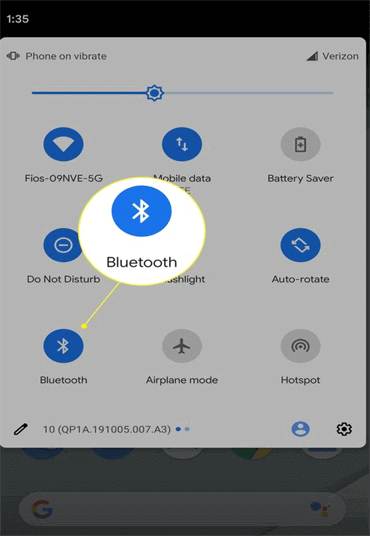
Likewise, turn off GPS after navigation. So, limiting features helps control overheating effectively.
Method 4- Updating Samsung OS
Many users have reported that they faced Samsung overheating while charging or gaming issues due to using an outdated OS version. So, they updated the operating system to the latest version, which helped to get this fixed.
To do so, follow the steps:
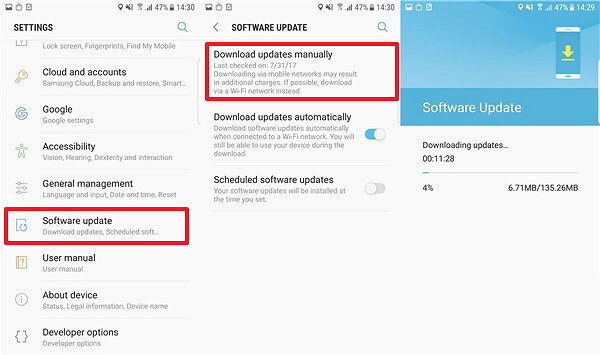
- Navigate to Settings > About Phone.
- After this, tap on Software Update.
- Now, if any new version is waiting to be downloaded, tap on Download and Install.
Method 5- Don’t Use Phone While Charging
Charging the mobile already generates internal heat. Using the phone during charging worsens the situation. All you need to do is to avoid playing games or video streaming while charging.
Instead, let the phone charge undisturbed. As a result, battery temperature remains within safe limits.
Also Read: Moisture Detected in Samsung Explained: Get Expert Insights
Method 6- Wipe the Cache Partition
Wiping the cache partition from your Samsung device is an excellent solution. This will remove the temp data and system files that might be causing the issue.
Here are the steps to be followed:
- Switch off your Samsung phone.
- Press & hold Power and Volume Up buttons together to enter a recovery mode.
- After that, highlight a Wipe Cache Partition option using Volume buttons>> again press Power button to select it.
- Once done, navigate to the Reboot system now >> choose it with a Power button.

Method 7- How to Stop Samsung Phone from Overheating by Using Power Saving?
Samsung offers a built-in power-saving mode, which sometimes reduces CPU usage. Well, activating this mode helps to control the background activity. Accordingly, your phone maintains safer temperatures.
If this method fails to work, try the next one.
Method 8- Factory Reset as a Last Resort
Sometimes, software corruption may cause the Samsung phone getting hot problem. Back up all important data first and perform a factory reset carefully to overcome this situation.
- Go to Settings >> Backup & Reset.
- Choose Factory Data Reset >> Reset Device.

- Lastly, tap on Erase Everything.
Method 9- When to Contact Samsung Support
If overheating continues, hardware issues may exist. Battery damage often causes excessive heat. In such a case, contact official Samsung service centers; they will surely help you in solving the current problem. Also, avoid 3rd-party repairs without certification.
Alternative Solution to Fix Phone Overheating: Android Repair Tool
If you want a quick solution to fix the phone overheating and crashing problem, try Android Repair software. It works effectively to solve all such issues on Android as well as Samsung phones.
Besides, the tool can fix numerous other phone issues like Android stuck on boot loop, apps keep crashing, black screen of death, etc. without any data loss.
Therefore, download this incredible tool and get rid of Android/Samsung problems instantly.
Here’s a link to its User Guide.

Note: It is recommended to download and use the software on your PC or laptop only.
Frequently Asked Questions:
It might be possible that your charging port may produce heat due to a damaged charging cable.
If your phone gets warm while using it, it won't affect the device's performance or lifespan.
Yes, extended overheating a phone can disturb your device’s battery life, overall performance or even cause permanent damage.
Entire series of Samsung Galaxy S22 heats the most while charging or continuously using it. Why Is My Samsung Overheating When Charging?
Is It Bad If Your Phone Gets Hot on Samsung?
Can Overheating Permanently Damage a Phone?
Which Samsung Phone Heats the Most?
Also Read: Fix Firmware Upgrade Encountered an Issue on Samsung
Conclusion
I am sure the solutions mentioned in this post have helped you to solve how to stop Samsung phone from overheating. The fixes above have already helped so many users to troubleshoot the Samsung phone getting hot issue. In addition, Android Repair Tool is the perfect way to deal with OS related problems and prevent data loss.
Moreover, maintain healthy charging and usage habits. Ultimately, consistent care keeps your Samsung mobile cool and reliable.


James Leak is a technology expert and lives in New York. Previously, he was working on Symbian OS and was trying to solve many issues related to it. From childhood, he was very much interested in technology field and loves to write blogs related to Android and other OS. So he maintained that and currently, James is working for androiddata-recovery.com where he contribute several articles about errors/issues or data loss situation related to Android. He keeps daily updates on news or rumors or what is happening in this new technology world. Apart from blogging, he loves to travel, play games and reading books.