
App cache not only eats up your storage but also triggers several problems and errors. So, clearing the app cache regularly is a must to maintain storage and avoid problems occurring because of it. Now, if you are wondering how to clear app data cache on Android, read this article.
To recover deleted Android data, we recommend this tool:
This effective tool will recover lost, deleted, inaccessible data from any data loss situations in no time. Now recover your lost and deleted data in just 3 easy steps:
- Download this Data Recovery Tool (for PC only, for Mac) rated Excellent on Pcmag.com.
- Select the storage media you wish to recover data from and click on Scan.
- Preview the files before recovery and choose Recover option to restore deleted data from Android.
Why Should I Clear the App Cache?
Clearing the app cache on your Android phone can be beneficial in many ways. Here are some of the benefits of clearing the app cache:
- Free up storage- App cache & data contains temporary and junk data that takes up a significant amount of your device’s storage.
- Resolves in-app issues- Most app issues and errors occur due to accumulated corrupted cache. So, clearing the cache can help you resolve different in-app problems.
- Secures privacy- Some apps contain important data such as login credentials, browsing history, and many more in their cache. Therefore, by clearing app data and cache you can secure your privacy.
- Enhance app speed- Accumulated app data and cache can slow down the app’s performance. So, by wiping the data and cache of the app, you can enhance its performance and speed.
How to Clear App Data Cache on Android?
To clear the app cache on an Android phone, you can use any 3rd party software or clear the app cache through Settings.
Method 1: Clear App Data Cache on Android Through Settings
You can wipe app data and cache through Settings on your phone. To clear app cache on Android, follow these steps:
- Open the Settings application on your phone.
- Next, go to the Apps or Application management section.

- Scroll through the app list and select the app for which you want to clear cache data.
- Now, choose the Storage usage option on the app screen.

- Lastly, click on Clear data and Clear cache options.

Method 2: Use 3rd Party Software to Clear App Data & Cache
There are several cleaner apps are available to clear app data & cache on Android. So, use any reliable software and get rid of the app data cache.
Here are some of the best third-party apps to clean app cache:
CCleaner

CCleaner is one of the best & reliable software to clear your app cache data. The app has been around for decades and has gained its reputation for being the most effective cleaning tool. The app is available on Play Store and has free availability.
Pros:
- It has a user-friendly interface that makes its usage easy.
- The app enhances your system as well as the app’s performance.
- Offers customizable cleaning options.
- The software provides you with regular updates
- It protects your privacy by deleting your cache data, browsing history, temporary files, etc.
Cons:
- Potential for accidental deletion of important data.
- It consists of in-app ads.
- Limited features are available in the free version.
All-In-One Toolbox

All-In-One Toolbox is another comprehensive tool used to clean app cache and junk files on Android devices. It provides users with a wide range of features such as cleaning devices and app cache and enhancing device performance. The app is available on Play Store for free. It comes with battery saver features that improves battery life of your phone.
Pros:
- It offers a wide range of features including cache clearing, file manager, app manager, system cleaner, and many more.
- The app is easy to use.
- It offers customizable cleaning options.
- This also provides battery saver feature that helps extend your phone’s battery life.
- It provides regular updates.
Cons:
- It supports in-app ads.
- Limited compatibility on several devices.
- The free version includes limited features.
- Less reliability.
Avast Cleanup

Avast Cleanup is also one of the most effective and widely used software to clean your phone and app cache. It enhances your device performance by clearing junk files on your phone. It is available both for free and paid versions.
Pros:
- The software has a user-friendly interface and is easy to use.
- It optimizes your system by clearing junk cache data on both the system and the app.
- The app offers an app manager that helps in the easy uninstallation of apps and clearing their data.
- Includes an in-built antivirus feature that secures your device from malware.
- It also comes with battery saver features that improve your device’s battery life.
Cons:
- It is ad-supportive.
- The paid version can be expensive.
- Limited features are available in the free version.
- High chances of accidental deletion of important files.
Bonus Tip: Recover Lost Data Using Android Data Recovery
While clearing the app data cache if you lost any of your important data, must try our Android Data Recovery tool to recover deleted data on Android.
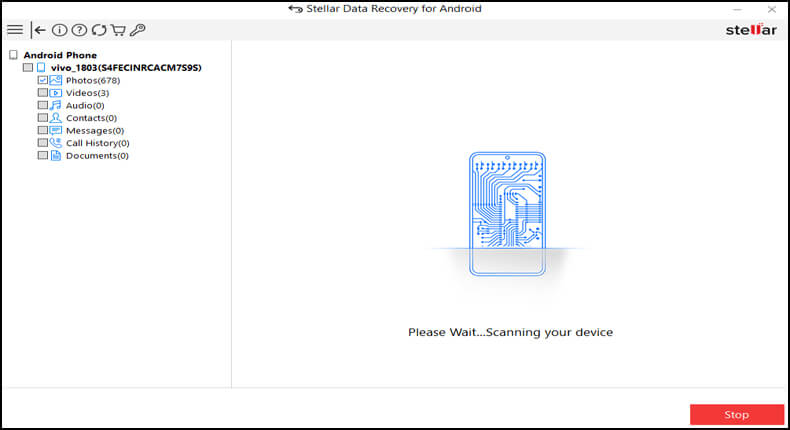
This software can also recover deleted app data on Android. It uses a deep scanning feature to look for deleted data and then recover them.
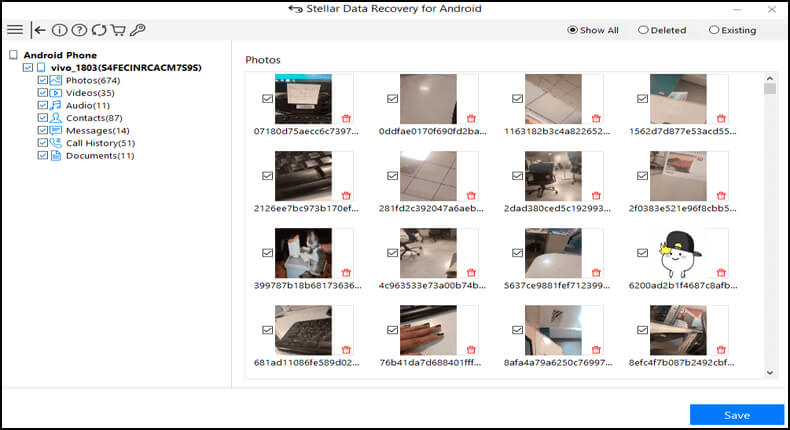
It is supported on a wide range of Android devices and can recover any Android data including photos, videos, memos, call logs, messages, and many more.
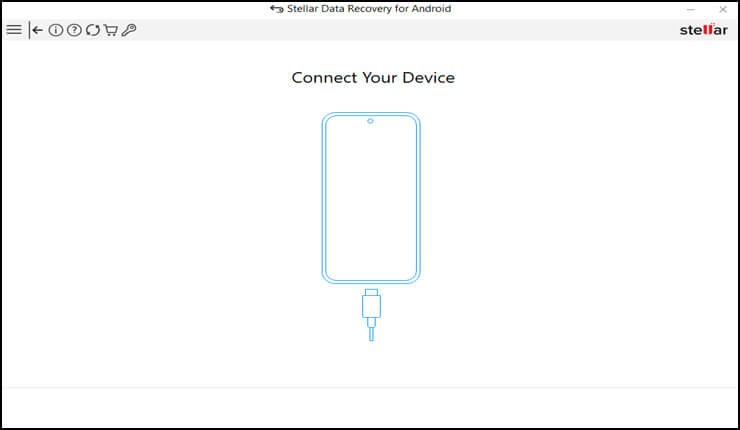
Download the software on your system and follow the below user guide instructions to use it.
 btn_img
Note: It is recommended to download and use the software on your PC or laptop. It is because recovery of phone data on the phone itself is risky as you may end up losing all your data because of data overriding.
Follow Step-by-Step Instructions To Use Android Data Recovery

FAQs (Frequently Asked Questions)
What is cached data?
Well, cached data are those data, which includes files, images, and several other media files that your device stores through an app or by visiting a website.
Is it safe to clear app data and cache on Android?
Yes, of course, clearing cached data is safe. remember that deleting the cached data does not wipe away any confidential information from your device like data or passwords, etc.
When should I clear app data and cache on my Android phone?
There are few considerations, which can tell you when you should clear your Android phone cached data.
- When a device is facing low storage.
- In case of any app problem or error.
- Phone becoming sluggish or crashing.
Conclusion
Clearing app data cache regularly on your Android phone is a good habit. As it not only enhances app performance but also helps you resolve many internal app issues and errors.
So, make sure to clear app data cache on Android using the above method. Also, do not forget to use Android Data Recovery software to recover lost data in case of any accidental deletion.
For any further queries or doubts, must visit us on Twitter or Facebook.

James Leak is a technology expert and lives in New York. Previously, he was working on Symbian OS and was trying to solve many issues related to it. From childhood, he was very much interested in technology field and loves to write blogs related to Android and other OS. So he maintained that and currently, James is working for androiddata-recovery.com where he contribute several articles about errors/issues or data loss situation related to Android. He keeps daily updates on news or rumors or what is happening in this new technology world. Apart from blogging, he loves to travel, play games and reading books.