
If you have a great music collection in your iTunes and now want to transfer music from iTunes to Android phone, just read this article.
Here, we have mentioned the different ways to transfer your iTunes music to Android phone.
How to Transfer Music From iTunes To Android Phone?
If you are looking for a way to transfer your iTunes music collection to an Android phone, Android Transfer is the best and the most recommended software.
If you are looking for a hassle-free transfer of iTunes music to Android, Android Transfer is considered the best software. Using this software, you can not only transfer iTunes music to Android but can also move other iTunes data such as music, podcasts, movies, etc. Apart from this, you can also use this tool to transfer photos, videos, music, contacts, messages, bookmarks, ringtones, voice memos, and many more between Android & iOS devices. This tool has a user-friendly interface and can be operated with a few simple clicks. So, just download the software and follow the below instructions to use it to transfer iTunes music to your Android phone. Note: It is recommended to download and use the software on your PC or laptop only.Method 1: Use Android Transfer [Quick Transfer]
 btn_img
Steps to Use Android Transfer
How to move data between devices?
Step 1 - Connect Your Phone to a PC
Launch Android Data Transfer program on your PC, and choose "Phone Transfer" option among the various stated tools.

Now, get both the devices connected to each other. Here, we will take the Android & iOS device as an example. You can try Android to Android also.

Although the files will be shifted from a source device to destination one. Here, you can click on "Flip" option to exchange their place.
Step 2 - Select the Data & Begin to Transfer
Choose the files that you want to transfer. Next, click on the Start Transfer option to start the transferring process. Ensure that you don't disconnect any of the device until the transferring process gets over.

After this, you can check the box named "Clear Data before Copy" if you wish to remove data on a destination mobile before shifting the files to a target phone.
Now, all the data will be transferred to a target mobile successfully.

Method 2: Move iTunes Music to Android Manually
This is another method using which you can move your iTunes music to Android. This method can be time taking and also consist a risk of data loss. However, you can go for this method as it is economical and doesn’t require any third-party apps.
For this, you need to follow the below steps:
- Open iTunes on your PC.
- Go to Edit > Preferences.

- Click on the Advanced.
- Next, select the “Copy files to iTunes Media folder when adding to library” option.

- Now, all the media files of iTunes will be stored in the media folder.
- Then, connect your Android phone to your PC using a USB cable.

- Enable Transfer files on your Android phone.
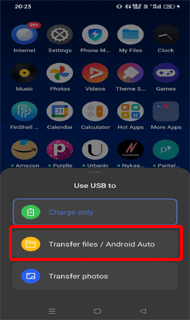
- Once the phone is detected on the PC, copy the complete iTunes music from the media library.
- And, paste them on your Android device.
Method 3: Use Apple Music to Move Music from iTunes to Android
Another way you can use to transfer iTunes music to Android is by using Apple music. So, if you have its subscription, you can use it to move your iTunes music to your Android phone. Here’s how:
- Launch iTunes on your PC.
- Click on Edit and go to Preferences.

- Now, head to the General tab, select the iCloud Music Library option, and click on OK.

- Once done, launch Apple Music on your Android phone.
- Head to the Library section.

- You’ll find all the music here. Now, download the songs, albums, and playlists on your Android phone using the Download button next to each of them.
Method 4: Transfer iTunes Library to Android Using 3rd Party Apps
There are several 3rd-party apps available on the Play Store that you can use to move your iTunes library to your Android phone. Here are a few popular options:
-
iSyncr

iSyncr is the best app to transfer your iTunes library to Android. Using this app, you can sync your entire iTunes data including music, videos, podcasts, and playlist with an Android device.
This app is easily available on Play Store. It offers wireless syncing of the iTunes library to Android devices. The app offers both free and paid versions.
Pros:
- Users can sync a wide range of iTunes data to Android devices including albums, music, playlist, podcasts, and many more.
- Offers wireless syncing which is more convenient than a wired connection.
- It provides customizable syncing for selective selection.
- Works with multiple Android music apps including Rocket Player, Poweramp, etc.
Cons:
- It can be costly.
- The free version includes limited features.
- Limited compatibility.
-
doubleTwist

Another app to transfer iTunes music to Android is doubleTwist. It is one of the most popular Android media player apps that offers a wide range of features including wireless syncing, podcasts playback, etc.
Also, the app supports multiple audio formats such as AAC, MP3, FLAC, and many more. It has a simple interface that makes it easy to use.
Pros:
- It offers excellent music and podcast playback experience.
- Supports multiple audio formats.
- Easy to use.
- It is compatible with various streaming services such as Tidal, Spotify, and SoundCloud.
Cons:
- Limited device compatibility.
- It offers limited features.
- The app can be expensive.
-
MediaMonkey

MediaMonkey is also one of the popular apps to transfer iTunes music to Android phones. You just need to import your iTunes music to MediaMonkey and then transfer the same to Android. It converts the iTunes music files to Android-supportable formats which makes the data accessible on your Android phone when transferred.
Pros:
- It automatically converts iTunes music files to Android-supportable formats.
- Easy syncing of iTunes music.
- It is highly customizable, allowing you to select from a variety of layouts.
Cons:
- The interface is quite confusing which makes it difficult to use.
- Its Pro version is expensive.
- Limited video playback option.
Conclusion
This was all about the different ways with the help of which you can transfer iTunes music files to Android devices easily. You can select any of the above-listed methods for doing so according to your choice.
I hope the above-given methods helped you in accessing iTunes music on Android. If you found this article helpful, then do share it with others, and don’t forget to follow us on Facebook and Twitter.

James Leak is a technology expert and lives in New York. Previously, he was working on Symbian OS and was trying to solve many issues related to it. From childhood, he was very much interested in technology field and loves to write blogs related to Android and other OS. So he maintained that and currently, James is working for androiddata-recovery.com where he contribute several articles about errors/issues or data loss situation related to Android. He keeps daily updates on news or rumors or what is happening in this new technology world. Apart from blogging, he loves to travel, play games and reading books.