Did you factory reset your phone but forgot your Google account credentials and wondering how to bypass Google account verification after reset? If ‘Yes’, do not worry as here in this article we have covered the different ways to bypass Google account verification on your device.
But before jumping straight to the methods let’s first know Google account verification in detail and how it works.
To bypass Google Account Verification after reset, we recommend this tool:
This effective tool can remove lock screen with PIN, pattern, password and fingerprint quite easily. Now bypass Android locked screen in just 3 easy steps:
- Download this Android Lock Screen Removal tool (for PC only, for Mac) rated Excellent on Trustpilot.
- Launch the program and select the device information such as brand, model name etc. to unlock the phone.
- Click Next & wait for unlock process to complete.
What is Google Account Verification & How it works?
Earlier Android phones are vulnerable to privacy and security. Anyone can get access to your device simply by bypassing your screen lock by factory resetting it.
But with FRP (Factory Reset Protection) the task of bypassing the screen lock after factory reset becomes difficult. Google account verification works as a security wall that protects your device from third-party access. Even if your device has been reset by a third party, the person has to go through Google account verification to break into your device.
However, the owner of the device with the Google account credentials can only access the device after a hard factory reset.
How to Bypass Google Account Verification After Reset on Android?
There is no such official way to do it. However, there are some other ways by which you can bypass Google account verification after resetting.
Method 1: Use Android Unlock to Bypass Google FRP
If you are looking for a hassle-free and one-click way to bypass Google FRP without a password, use Android Unlock.
This powerful software not only helps you bypass Google FRP, but you can also use it to unlock any kind of screen lock. It can remove patterns, PINs, passwords, fingerprints, etc locks without data loss.
Also, it supports various Android phones including Samsung, Sony, HTC, LG, Huawei, Motorola, Xiaomi, Google Pixel, and others.
The software works tremendously and has a high success rate in bypassing FRPs and unlocking phones. So, just download the software and follow its user instructions.
 btn_img
Note: It is recommended to download and use the software on your PC or laptop only.
Method 2: Bypass FRP by Google keyboard
You can bypass FRP with a Google keyboard. Below are the steps to do so:
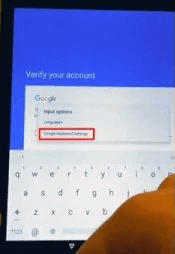
- On the verification screen long hold @ key on the appeared keyboard.
- After that Settings menu will open, select the Google keyboard Settings option.
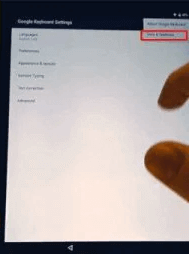
- Next, tap on the three dots appearing at the top-right corner and click on the option Help & Feedback.
- Now, go for Using Google Keyboard option under the help section and long hold any key, and tap on Web search.

- Type Settings in the search box and locate the option About Phone.
- Next, search for the Build number and press it 7 times to enable the Developer option.
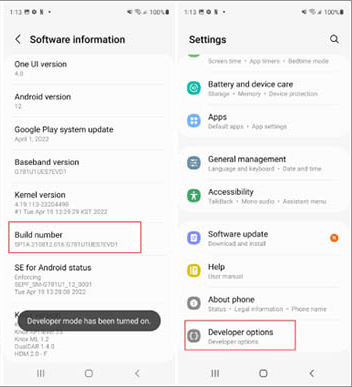
- Now, go back to the menu section and select the Developer option.
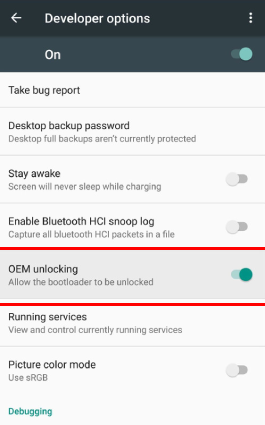
- Select OEM Unlocking option and click on back two times.
- Lastly, reboot your device and connect to the internet.
- Now, you can add a new Google account as you have successfully passed the verification.
Method 3: Bypass Google FRP Without Internet
Follow the steps guide below to do so:
- Put the SIM card into the locked device and dial the number associated with that SIM from another device.
- Next, answer the call on the locked device and save the contact with Add New Contact option.
- Now, on opened add contact form tap any string of numbers.
- Then, click on Save and further select Google.
- Create a new Google account.
- Lastly, reboot your device.
- You have successfully bypassed your Google account verification.
Method 4: Bypass Google Verification Without SIM Card
Below are the steps to bypass Google verification without a SIM card:
- Pull out the SIM card from the device and reboot it.
- Pass over the SIM notification and select the language.
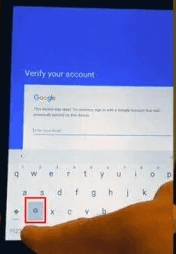
- Next on the appeared form where you have to provide email and phone number details, long hold the “@” key.
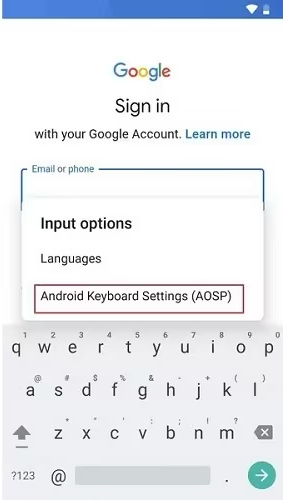
- Now on the appeared Settings menu choose Android keyboard Settings.
- After that tap on Back>Home to activate the Google search engine.
Note: [Google search engine will appear on your device’s Home screen.]
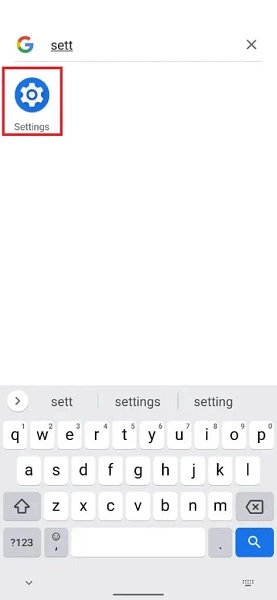
- Now, in the search box type “Settings” and go for the corresponding section.
- Next, turn off Saving backups and Auto-restore.
- Lastly, again reset the settings with hard reset and get access to your device.
Method 5: Bypass Google Verification with SIM Card
- Put the SIM card into the locked device.
- Dial the number associated with the SIM from another device.
- Next, tap on “+” sign to add a new call on the locked device.
- Now, in the appeared window type the code *#*#4636#*#*.
- If the above steps are performed correctly, you will see a Settings menu.
- Under Settings, choose Restore and Reset option.
- Next, turn off the Data copying and Auto-recovery option.
- Finally, restore the settings and reboot the device.
How To Bypass Google Account Verification After Reset Samsung?
Well, most of the users use Samsung devices. So, if you are a Samsung device user then you can go for the below-guided steps to bypass Google account verification on Samsung.
- Install Android Unlock on your system.
- Next, connect your locked Samsung device to the system via USB.
- Now connect the system to the internet.
- After that open Android Unlock and select the option “Remove Google Lock (FRP)”.
- Then tap on Start.
- Now select the OS version of your locked Samsung device. Make sure to select the correct version.
- Once selected, the software will then send a notification to your device.
Note: [Don’t use the device when the sending process is in progress. Also, make sure your device is been properly connected to the system during the process.]
- After receiving the notification follow the onscreen guide displayed by the software. In a few minutes, your Samsung device is all set to get accessed by you.
FAQs (Frequently Asked Questions)
What is FRP lock?
FRP (Factory Reset protection) is a system that provides extra protection to your Android device. With FRP lock one can pre-protect their device from third-party access when being stolen or lost.
How to bypass the FRP lock without a computer?
Follow the steps below to do so:
- Open Settings.
- Go to Accounts>Google.
- Select the Google account to remove.
- Tap on the three dots at the top-right corner
- Then click on Remove account.
- Lastly, confirm it by pressing OK.
How do I remove FRP?
Disabling FRP is probably the easiest way to bypass Google verification. For this, you just need to follow the easy below steps:
- Open the Settings option.
- Next select the option Cloud and accounts.
- Select Accounts.
- Look for the option Remove account and tap on it.
- Confirm by clicking on Remove account if prompted.
Conclusion
Forgetting your Google account credentials is a common problem. However, bypassing FRP is a tricky thing to do.
Well, with this article, this won’t be any difficult and you are easily able to bypass the Google FRP. I hope, your query on how to bypass google account verification after reset got well answered.
In case, you have any further queries or doubts, feel free to get back to us on Twitter.