
Android phone users generally lock their phone using different locking options like PIN, password, a pattern so that others cannot access the device. But this privacy step sometimes becomes a headache due to the screen become inaccessible or when you forgot the password.
Your phone screen will be locked and the data stored on it will not be accessed. Most users face such types of incidents where they stuck and need help to recover photos from locked Android phones.
If the same situation is with you and looking for ways to rescue files from a locked Android phone then do read this blog. Here you will get to know some of the best ways on how to get pictures off a locked Android phone effectively.
Part 1: How To Get Photos Off A Locked Android Phone?
Now it’s time to go through the below-mentioned methods to see how to rescue photos from a locked phone.
Method 1: Use Android Data Recovery To Retrieve Photos From Locked Android Phone
If you don’t want to know what to do after the phone is inaccessible and data is lost then the best way is to use Android Data Recovery. This is one of the best-recommended software to retrieve pictures off a locked Android phone. Whether you have created a backup or not, this powerful tool helps you to recover all lost photos and allow you to access them as before.
This can effectively recover data from a locked Android phone without any difficulty. Whether the phone is protected by password, PIN, pattern, etc. the recovery program works with simple clicks. Not only photos but effectively rescue other data as well like contacts, videos, documents, notes, WhatsApp chats, audio files, and many more.
Therefore, you simply need to download Android Data Recovery software and get photos off a locked Android phone.
To know the complete steps on how to use the software, follow the user guide.
 btn_img
Note: It is recommended to download and use the software on your PC or laptop. It is because recovery of phone data on the phone itself is risky as you may end up losing all your data because of data overriding.
Method 2: Retrieve Photos From Locked Android Phone Using Google Photos
Another best way to get back lost photos from a locked Android phone is from Google photos. Whatever pictures deleted from the Android phone can be found in the Google Photos folder. It has a Trash folder that keeps deleted videos/photos for 60 days before they are removed permanently.
So you should also check it once for the missing pictures.
Here are the steps to recover deleted photos from Google Photos:
- First, open your Google Photos app on your phone
- Then on the left corner, tap on Menu
- And now select “Trash” or “Bin” folder
- Here you will get to see all deleted pictures, select them one by one that you want to recover, and hit on the Done option
- After that, tap on the Restore icon

Now all the photos will be restored to the Google Photos library and can be accessed as before.
Part 2: Unlock Your Android Phone Manually To Access Photos
Apart from the above two methods that will help you to recover photos from a locked Android phone, you should also try your phone to unlock using different methods. Maybe your phone is locked due to the wrong password, PIN, or pattern so you should find out some manual ways to unlock it.
Here are a few of the manual methods to help you out.
Way 1: Use Google Account To Unlock Android Phone
Whenever any wrong happens to your phone the most important thing that comes to mind is how to access the data stored on phone. If your phone is locked and you don’t know what to do then an easy way to unlock it is by using a Google account.
Here are the steps to follow:
- First, you need to enter the wrong password 5 times. This will lock your phone automatically. Now tap on the “Forgot password” or “Forgot pattern” option that you will get on the screen
- Click on it will send a request for your Google account username and password that you have to enter properly
- Now enter the password correctly once you tap on the “Sign-in” option and your phone will be unlocked.
Way 2: Use ADB Command To Unlock Android Phone
Another useful method that will easily unlock Android phones is by using the ADB command. This Android Debug Bridge (ADB) allows creating links between the device and PC.
Below are the steps to unlock an Android phone:
- First, download Android SDK on your PC and the extract ZIP file
- Remember to download all the important drivers on the device
- Now on PC, launch Command Prompt and then change ADB file location. Here you have to enter “cd C:/android/platform-tools” from the command prompt
- Next, connect your phone to the PC with help of USB cables. Here enter “adb command”, and then you will see a number in the command prompt message only when your device is identified.
- You have to enter two commands that are mentioned below. Once you enter the first one, enter the second one instantly. Remember that password should replace with 1234.
adb shell input text 1234
shell input keyevent 66
- Now you can see that your device is unlocked automatically and all data can be accessed or even can be backed up.
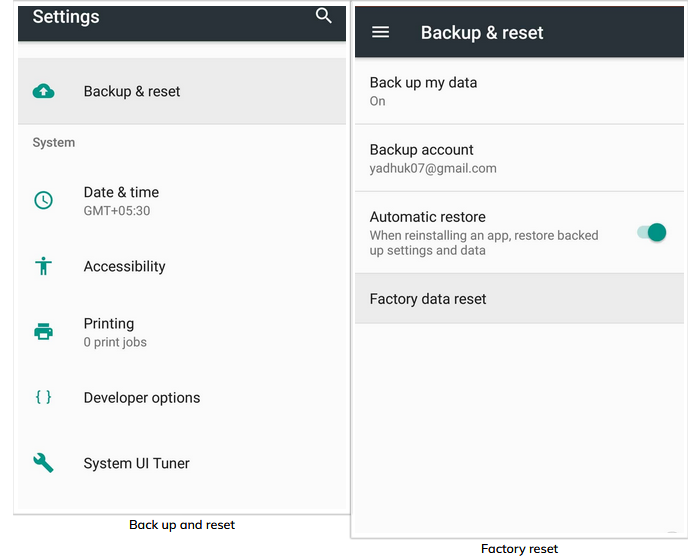
Way 3: Do Factory Reset Of Phone
The last option that is left with you are doing a factory reset. This will surely help you to unlock your device completely. But at the same time, your data will also be deleted from the device. So kindly backup all data before you perform a factory reset.
Here are the steps to follow:
- First, turn off your Android phone
- After that, select the Power + Volume up button together
- Now, press the Power + Volume up and Home button together depending on your device
- Once it is done successfully, you will enter recovery mode
- When you want to delete all settings and phone data, tap on “wipe data/factory reset” and “wipe cache partition”
- Now reboot your device and your phone pattern or password lock will be removed
Conclusion
So this blog totally describes how to get pictures off a locked Android phone. Anyone can come across this kind of situation where the device is locked and useful data cannot be accessible. But there are ways to deal with such a situation. To recover photos from locked Android phone instantly, the use of Android Data Recovery software is the right choice.


James Leak is a technology expert and lives in New York. Previously, he was working on Symbian OS and was trying to solve many issues related to it. From childhood, he was very much interested in technology field and loves to write blogs related to Android and other OS. So he maintained that and currently, James is working for androiddata-recovery.com where he contribute several articles about errors/issues or data loss situation related to Android. He keeps daily updates on news or rumors or what is happening in this new technology world. Apart from blogging, he loves to travel, play games and reading books.