
Read receipts in Instagram is an in-built feature that generally shows the “seen” status of a direct message by a recipient. There is no such feature to officially disable Instagram read receipts. However, if you are still keen to know how to turn off read receipts on Instagram, try the methods in this post to read Instagram messages without being notified to the sender.
Can You Turn Off Read Receipts on Instagram?
Basically, you cannot disable read receipts on Instagram. But it doesn’t mean that you cannot read messages on Instagram without letting the sender know the seen status. And when that being said, the question here comes is how to do so.
So, continue reading further to get an answer to your question.
How To Turn Off Read Receipts on Instagram?
Try the below tricks to read the received messages on Instagram without being noticed by the sender.
Trick 1: Read Messages in Airplane Mode
Reading messages being Airplane mode enabled will not let the sender know about the seen status. Here’s what you need to do:
- Launch the Instagram application on your phone.
- Next, tap on the Messenger icon at the top-right corner.
- Now, swipe down the shortcut panel and turn on Airplane mode.
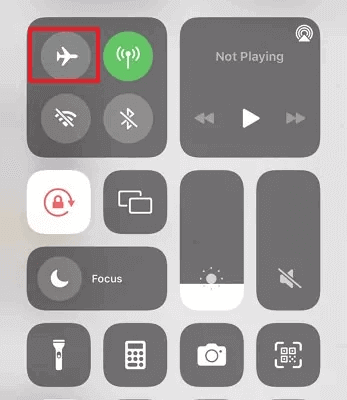
- When enabled, tap on the conversation in which you want to read the message.
Trick 2: Toggle Off Instagram Message Notifications
Another way you can try to turn off read receipts Instagram is by toggling off message notifications on Instagram. Message notifications can lead you to accidentally open the message that you were ignoring for a long time and also notifies the sender about the seen status.
Follow the below steps:
- Launch the Instagram app, and click the Profile icon.
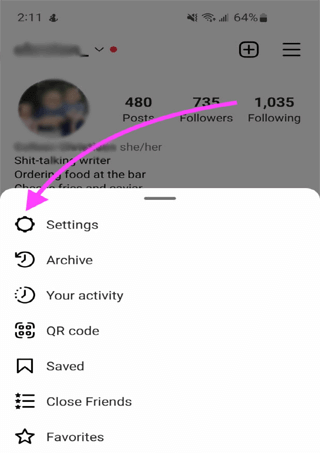
- On the Profile screen, click on the Hamburger icon.
- Select Settings from the appeared options menu.
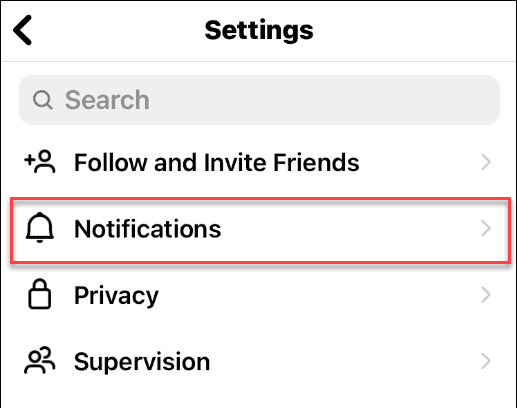
- Now, choose the Notifications option.
- Navigate to the Messages and Calls option and select it.
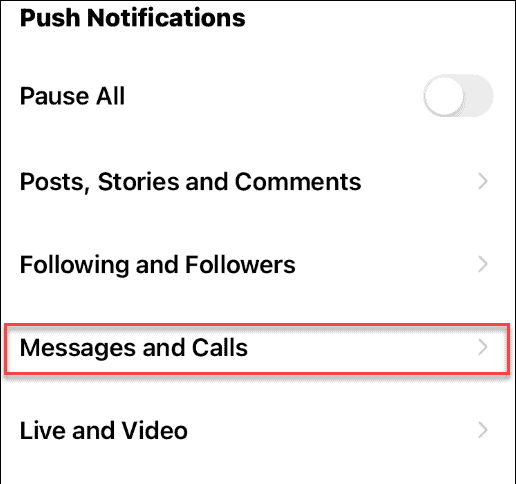
- Here, select the off option under both messages or message requests.

Doing this will disable message notifications, eliminating the chances of accidentally opening messages.
Also Read: How to See Old Notifications on Instagram?
Trick 3: Restricting the Sender
Restricting the sender and then reading the messages won’t notify them about the message seen status.
Here are the steps to follow:
- On Instagram, visit the Sender’s profile.
- Now, click on the three dots icon and choose the Restrict option.
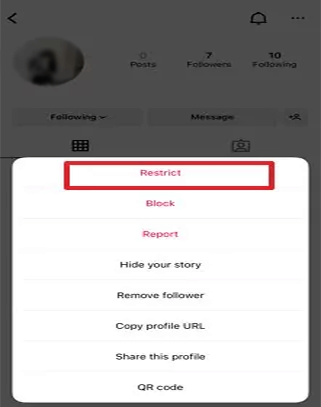
- When restricted, the messages received will appear in the “message requests” section.
- Now, read the message from the sender. This will not notify the sender about the seen status.
Also Read: How to See Hidden Messages on Instagram?
FAQs (Frequently Asked Questions)
What is Instagram read receipts?
Instagram read receipt is an in-built feature offered by Instagram that allows the sender to know the seen status for the sent message.
Why are read receipts on Instagram important?
Read receipts plays a vital role for instant messaging communications. It indicates the sender about the seen status of the message that they sent. But some users prefer to read direct messages without being noticed by the sender. So, to do so, one needs to read messages in offline mode to avoid triggering read receipts.
Conclusion
Though there is no official way to toggle off read receipts on Instagram, the blog covers some tricks to read messages without being noticed by the sender.
I hope we served you well through this article. Further, if you have any questions or doubts, feel free to ask us on Twitter. Also, follow us to get updates on our recent posts.

James Leak is a technology expert and lives in New York. Previously, he was working on Symbian OS and was trying to solve many issues related to it. From childhood, he was very much interested in technology field and loves to write blogs related to Android and other OS. So he maintained that and currently, James is working for androiddata-recovery.com where he contribute several articles about errors/issues or data loss situation related to Android. He keeps daily updates on news or rumors or what is happening in this new technology world. Apart from blogging, he loves to travel, play games and reading books.