
Telegram remains a popular messaging app around the world. It allows users to send messages, pictures, videos, and attachments (up to 2 GB) across devices. However, users sometimes face the Telegram video not playing on Android phone. Luckily, effective solutions exist. Well, in this blog, you will find numerous solutions to fix this problem.
But before getting into the fixes, let’s find out the causes behind this error first.
To fix Android-related issues, we recommend this tool:
This effective tool can fix Android issues such as boot loop, black screen, bricked Android, etc. in no time. Just follow these 3 easy steps:
- Download this Android System Repair tool (for PC only) rated Excellent on Trustpilot.
- Launch the program and select brand, name, model, country/region, and carrier & click Next.
- Follow the on-screen instructions & wait for repair process to complete.
Why are Telegram Videos Not Playing on Phone?
While stuck in this unpleasant situation, it is obvious to ask yourself what causes the Telegram video can’t play issue. So, answering your question, below are the possible reasons behind this problem:
- Network instability causes playback failure.
- Temporary operating system glitches.
- Corrupted Telegram app cache & data.
- Running an outdated version of Telegram.
- Activated VPNs sometimes block Telegram servers.
- Insufficient storage space.
How to Fix Telegram Video Not Playing on Android?
Follow the below-mentioned resolutions to get rid of the issue.
Way 1- Check Your Internet
Since Telegram is an online messaging platform, it requires a strong network connection to work properly. A weak connection often causes Telegram video playback issues or other glitches. So, if you are using mobile data, then switch to Wi-Fi or vice versa.
As a result, video playback may restore quickly.
Also Read: How to Fix Telegram Updating Problem Instantly?- (Works in 2025!)
Way 2- Restart Your App & Android
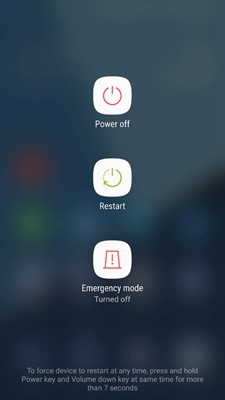
Another quick method you can try is restarting the Telegram app. Temporary app glitches can affect video while trying to play it. Besides, you can restart your Android phone once. After rebooting, open Telegram again. This simple step surprisingly resolves many issues.
Way 3- Clear Telegram App Cache
With time, accumulated cache & data get corrupted and start messing with the app’s functioning, causing various issues including Telegram video not playing in phone.
Clearing such a corrupted app cache can assist you in overcoming this situation. To do so:
- Go to your phone’s Settings.
- Tap on the App Manager or Applications

- Select the Telegram >> Storage usage
- After that, tap on the Clear dataand Clear cache
Way 4- Fix Telegram Video Not Playing on Android by Updating the App
Ensure that you’ve the latest version of the Telegram application installed on your mobile. Outdated versions may have compatibility bugs and can break video playback features.
To do so, follow the steps below:
- Go to the Play Store on your phone.
- Then, tap on the Profile icon >> select Manage Apps and Devices.
- Navigate to Updates available section & look for Update the Telegram.
- If the latest version is available, tap Update to install it.

Way 5- Change Telegram Video Download Settings
Sometimes, incorrect download settings within Telegram can block playback. All you need to do is to check and correct the video download settings by following the steps:
- Open Telegram Settings.
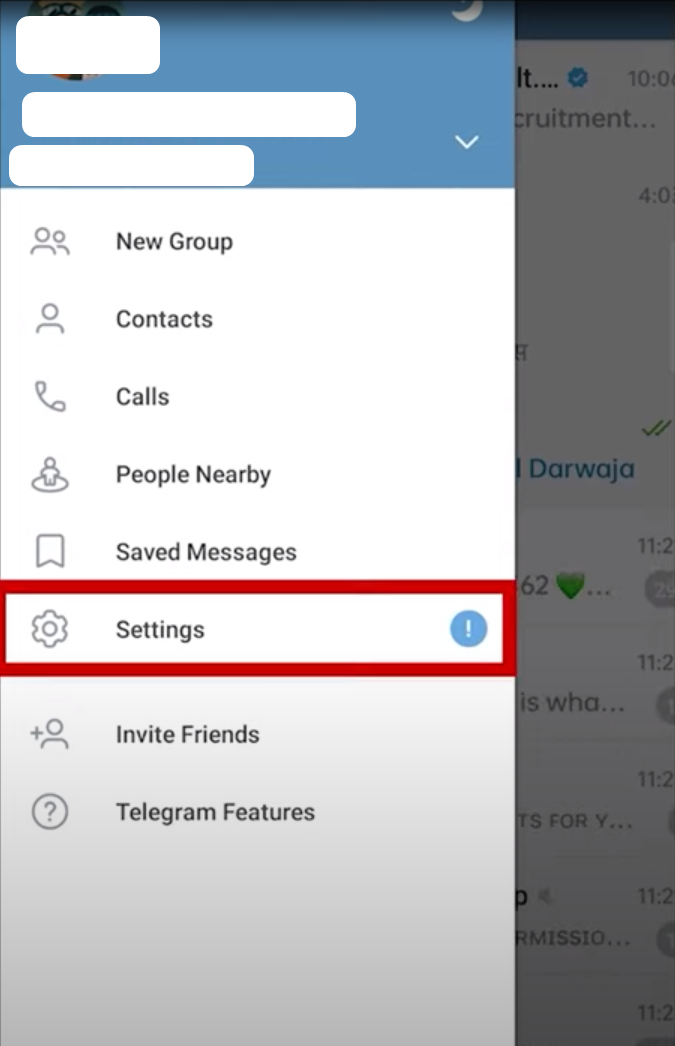
- Navigate to Data and Storage.
- Turn ON automatic media download on Wi-Fi and mobile data.
- After this, videos download completely before playing.
Way 6- Check Available Device Storage Space
As already mentioned in the causes, low storage prevents proper video buffering. Henceforth, check your Android phone’s storage immediately, and if it is nearly full, remove the unnecessary files or uninstall unused applications to free up storage.
Steps to be followed to check the available storage:
- Open the Settings
- Go to the About Phone.
- Choose the option Storage.
- Now, check the available space here.
Also Read: How to Fix Telegram Connecting Problem?- 7 DIY Solutions!
Way 7- Check Telegram Server Status
You may face a Telegram video can’t play problem when servers experience temporary outages. In such a situation, check the server status by visiting Telegram’s official channels or social media. If they show servers are down, wait patiently. Playback resumes automatically once the servers are restored.
Way 8- Disabling Battery Optimization for Telegram
Many users have reported that disabling the battery optimization helped them to solve Telegram downloaded video not playing. So, you can do the same thing, which means disable the battery optimization, as it may restrict background processes.
To do so, follow the instructions below carefully:
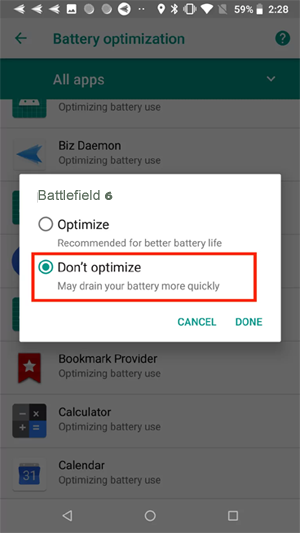
Step 1- Go to the Settings >> Apps, then choose the Telegram app.
Step 2- Tap Battery >> choose Unrestricted (or “Don’t optimize”) to allow background usage without limits.
Way 9- Disable VPN or Proxy Services
VPNs sometimes block Telegram servers. Thus, videos fail to stream properly. So, simply disable VPN services temporarily to tackle the situation.
- Navigate to Settings >> System option from a menu list.
- Turn OFF any active VPN.
- Remove proxy configurations.
Then, restart Telegram and test playback. Usually, videos load instantly afterward.
Frequently Asked Questions:
Telegram videos not showing in your gallery if the Save to Gallery is turned off, application permissions are missing, or they are stuck in the hidden folder.
Teleplayer is an excellent video player for playing Telegram videos
You can watch the downloaded Telegram movies within the app. Go to the Settings >> Data and Storage >> Storage Usage >> Media. Also, you can find them in the file manager of your phone, often in a Telegram or Downloads folder.
It might be possible that the Telegram app doesn't have the required permission to access the device's storage, that is why it can't play videos play only audio.
Yes, you can watch Telegram videos without them being downloaded to your device's permanent storage by disabling the automatic downloads in Settings > Data and Storage. Why Are Telegram Videos Not Showing in the Gallery?
Which Video Player Can Play Telegram Videos?
How To Watch Telegram Videos After Downloading?
Why Does Telegram Video Play Only Audio?
Can I Watch Telegram Videos Without Downloading?
Also Read: This Channel Can’t Be Displayed Telegram Error – Quick Fix in 2 Minutes!
Wrap Up
So, these are some of the quick fixes for Telegram video not playing on Android phones. I hope that if you’re coming across such a problem, then following the above solutions will definitely help you to fix it. They helped plenty of users, and now it’s your turn to take action.
Stay updated and enjoy seamless video messaging daily.


James Leak is a technology expert and lives in New York. Previously, he was working on Symbian OS and was trying to solve many issues related to it. From childhood, he was very much interested in technology field and loves to write blogs related to Android and other OS. So he maintained that and currently, James is working for androiddata-recovery.com where he contribute several articles about errors/issues or data loss situation related to Android. He keeps daily updates on news or rumors or what is happening in this new technology world. Apart from blogging, he loves to travel, play games and reading books.