
Many Roblox players have experienced and reported the error “This item is not currently for sale. Your account has not been charged.” in the community sites. This warning is displayed when a user tries to purchase a product that is not for sale. As a result, users cannot complete Robux purchase & in-app transactions smoothly.
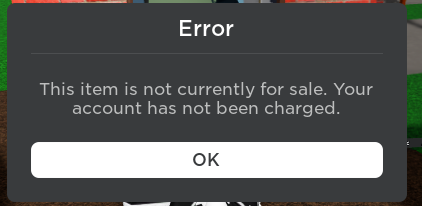
In this blog, we’ll explore the intricacies of this error, providing you with expert insights & methods to fix it.
To fix Android-related issues, we recommend this tool:
This effective tool can fix Android issues such as boot loop, black screen, bricked Android, etc. in no time. Just follow these 3 easy steps:
- Download this Android System Repair tool (for PC only) rated Excellent on Trustpilot.
- Launch the program and select brand, name, model, country/region, and carrier & click Next.
- Follow the on-screen instructions & wait for repair process to complete.
Why Does Roblox Say My Account Has Not Been Charged?
Well, this error message rarely involves an actual payment failure, processing delays, or verification checks.
However, it happens due to various reasons, including:
- Unstable internet connections.
- The transaction request may fail before confirmation.
- Outdated app versions.
- Corrupted Roblox cache.
- Payment modules may malfunction.
- Insufficient balance can trigger the message.
- Roblox server outages.
Meanwhile, the system might still process the request silently.
Also Read: Roblox Connection Error: 7 Troubleshooting Tips for Seamless Gaming
How to Fix Your Account Has Not Been Charged Roblox Mobile?
Follow the below step-by-step methods to fix this item is not currently for sale your account has not been charged ROBLOX error.
Fix 1- Use a Robust Internet Connection
A weak internet connection is the foremost reason for such a problem. Roblox requires a strong internet connection for an error-free gameplay experience. Therefore, make sure to use a stable network while playing games on Roblox.
If you are using mobile data, then switch to a WiFi network or vice versa to ensure secure transaction processing.

Fix 2- Verify Payment Method Details
Since the message, your account has not been charged Roblox Mobile is associated with purchases. So, it is vital to review your saved payment information carefully. Incorrect card details cause silent transaction failures.
All you need to do is check the expiration date and billing address. Also, confirm sufficient funds in your account. Even small mismatches prevent authorization approval.
Fix 3- Clear Cache of Roblox App
Corrupted cache and data of the Roblox Mobile application can also lead to this annoying message. So, consider clearing them by following the steps below:
- Go to the Settings of your phone.
- Tap on the Apps >> Roblox >> Storage.
- After that, tap on both Clear Cache and Clear Data buttons.

Also Read: 9 Ways To Fix This Purchase Was Not Completed Roblox Effectively
Fix 4- Update the Roblox
An outdated version of the game app often causes payment verification glitches. Thus, ensure to stay updated with the latest version to reduce recurring errors.
Here are the steps to be followed:
- On the Google Play Store >> tap Profile.
- Choose Manage Apps and Devices.

- Go to the Updates available section & scroll through the list to find Roblox.
- Finally, tap on Update button to install the latest version.
Fix 5- Check Roblox Server Status to Solve Your Account Has Not Been Charged Roblox Mobile
Sometimes, the issue originates from Roblox servers. Server maintenance can cause various problems and even interrupt transaction confirmations.
Consequently, check the server status by visiting the official Roblox website. If servers show downtime, wait patiently.
Fix 6- Reinstall Roblox for a Fresh Setup
Uninstalling and reinstalling the Roblox application is another effective way to troubleshoot if your account has not been charged Roblox Mobile error. Follow the instructions below carefully to do so:
- Find the Roblox icon on the Home screen.
- Then, long press the icon & select App info.
- Tap Uninstall option & confirm the same.

- Once uninstalled, go to the Play Store
- Look for the Roblox app >> install button.
Fix 7- Contact Roblox Support
If none of the above troubleshooting methods work, contact the Roblox Support Team. They will surely help you to overcome this situation.
Provide screenshots of the error message to ensure getting the relevant solution from the professionals to address the error issue. Support agents usually respond within a few days. Meanwhile, avoid initiating new purchase attempts.
Frequently Asked Questions:
How Do You Charge Your Roblox Account on Mobile?
You can subscribe on the Roblox mobile app, by saving credit/debit card, or with Roblox Credit from gift cards.
Why Is Roblox Not Allowing Me to Purchase Robux?
Roblox may not allow you to purchase Robux due to one of the following reasons:
- Roblox app is not updated.
- Corrupted data of Roblox app.
- Misfunctioning of the app.
- If the Roblox server is down.
How to Fix Your Purchase Failed on Roblox?
To fix your purchase failed on Roblox, follow the below tips:
- Close & re-open the app.
- Reboot your phone.
- Reinstall the Roblox app.
- Clear Roblox app data.
- Check your date and time.
Also Read: Fixed- ROBLOX Error This Experience Is Currently Not Available!
Packing Up
This item is not currently for sale your account has not been charged ROBLOX error message appears frightening. However, it rarely means permanent payment failure. By applying the fixes outlined in this post, you can tackle this situation and restore smooth purchases in no time.
Secure payments depend on stable connections and accurate details. Roblox mobile transactions should feel seamless and reliable.
Thanks for reading!


James Leak is a technology expert and lives in New York. Previously, he was working on Symbian OS and was trying to solve many issues related to it. From childhood, he was very much interested in technology field and loves to write blogs related to Android and other OS. So he maintained that and currently, James is working for androiddata-recovery.com where he contribute several articles about errors/issues or data loss situation related to Android. He keeps daily updates on news or rumors or what is happening in this new technology world. Apart from blogging, he loves to travel, play games and reading books.