
If you’re facing your account is restricted right now WhatsApp error, don’t be surprised. This restriction is faced by many Android phone users. It usually appears when the system detects unusual activity.
Here’s the screenshot of the error:
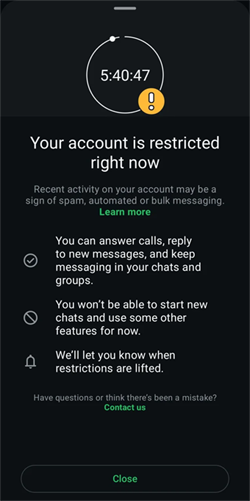
In this article, I will explain why this WhatsApp error occurs and how to fix it to protect the platform from spam or policy violations. So, let’s proceed…
To fix Android-related issues, we recommend this tool:
This effective tool can fix Android issues such as boot loop, black screen, bricked Android, etc. in no time. Just follow these 3 easy steps:
- Download this Android System Repair tool (for PC only) rated Excellent on Trustpilot.
- Launch the program and select brand, name, model, country/region, and carrier & click Next.
- Follow the on-screen instructions & wait for repair process to complete.
What Causes Your WhatsApp Account Is Restricted on Android?
Several factors may trigger the restriction error in WhatsApp. Consequently, understanding the exact causes helps prevent the problem in the future.
- Sending too many messages within minutes
- Using unofficial WhatsApp apps such as GBWhatsApp or WhatsApp Plus.
- Multiple users report your number.
- Using an outdated version of the application.
How to Fix Your Account Is Restricted Right Now WhatsApp Error on Phone?
Under this section, you will get numerous tricks to troubleshoot this error message. All the resolutions are very effective & surely help you.
Method 1- Wait for the Restriction Timer
Sometimes, the restriction or temporary ban appears with a countdown timer (e.g., 24 hours). A timer in the WhatsApp app will tell you when it ends.
In this case, wait until the timer ends. Once the countdown finishes, you can start accessing and messaging on WhatsApp.
Also Read: WhatsApp Error FIXED – This Audio Is No Longer Available [100% Working]
Method 2- Update WhatsApp Application
Another foremost reason for the occurrence of your account is restricted right now WhatsApp group problem is running the outdated version of the app.
Thus, it is recommended to update the WhatsApp app to the latest version. This will solve several bugs or problems along with this error.
Follow the steps below:
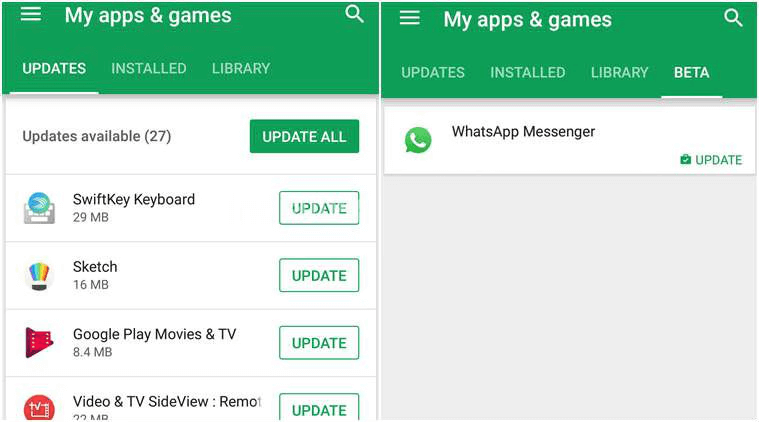
- On your Android, go to the Google Play Store.
- Tap on My Apps & Games
- Here, you will see the list of all the installed apps >> select WhatsApp.
- Lastly, if there is any update available, tap on Update.
Method 3- Request a Review from the App
When WhatsApp shows a ban notice that tells your account is restricted, the top urgency is to appeal the ban & recover your account.
Here are the steps to be followed:
- Open WhatsApp >> look for the ban details.
- Next, if it’s there, simply tap on “Request a review.”
- Now, sign the appeal form & complete the procedure.
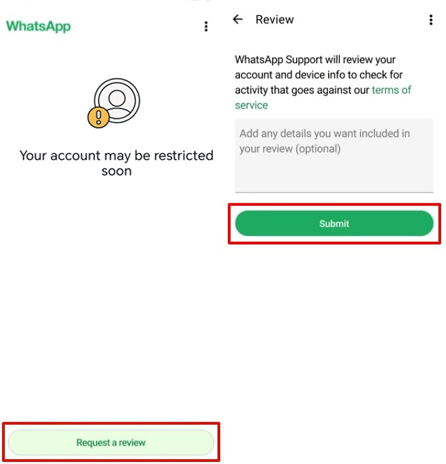
- When you submit the appeal, you have to wait for the feedback.
If the “request” option is missing there, you can send an email to support@whatsapp.com & ask them to review your account.
Method 4- Switch to the Official WhatsApp App
Most of the time, users use unauthorized third-party apps such as GbWhatsApp, YoWhatsApp, FMWhatsApp, WhatsApp Plus, WhatsApp Aero, etc., which can temporarily suspend your actual account.
In such a situation, uninstall any modified versions immediately and install the official app from the Google Play Store.
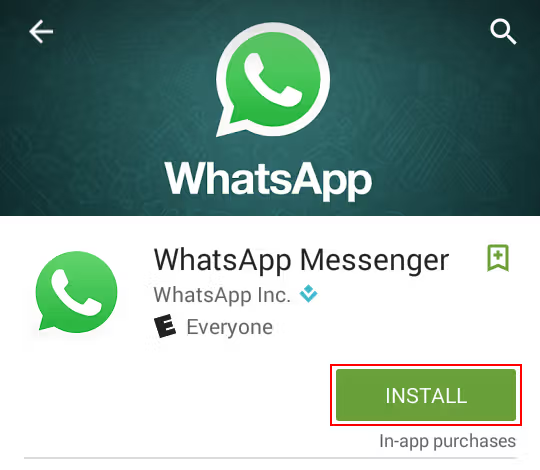
- Open the Google Play Store.
- Search for ‘WhatsApp Messenger’
- Next, tap on ‘Install’.
- Then verify your phone number.
- This step often removes temporary restrictions.
Also Read: Fix Waiting for This Message This May Take a While in WhatsApp!
Method 5- Fix Your Account Is Restricted Right Now WhatsApp Error by Using VPN
Using a VPN application is an excellent trick to solve this error. It will not only eliminate the geo-restrictions but will also improve the internet connectivity when using WhatsApp.
- Install any VPN application from Google Play like ExpressVPN.
- When downloaded & installed successfully, open the ExpressVPN app on your phone.
- Now, you will see a big “Toggle” button that declares Connected. Tap it once to turn it ON.
And you are done!
Recommended: Use Android Repair Tool
If you face a WhatsApp app crashing or freezing problem on your Android phone, I recommend you use the most versatile Android Repair tool.
You just need to download & install this feature-loaded software on your PC and then follow its user manual.

Note: It is recommended to download and use the software on your PC or laptop only.
Related FAQs:
When WhatsApp says ‘Your account is restricted right now’, it simply means that current activity on your account might be display signs of spam, or bulk messaging, which disrupts WhatsApp’s terms & policies.
To remove restricted chats on WhatsApp, go to your WhatsApp Settings. Then, tap on Privacy >> Chat Lock option >> Unlock and clear locked chats.
WhatsApp chat groups are mainly restricted to comply with their legal obligations. This problem can be easily escaped by group admins. They can request a review of a suspended group.
WhatsApp restrictions or temporary ban can last between 24 and 48 hours. What Does It Mean When Your Account Is Restricted on WhatsApp?
How Do I Remove Restricted Chats on WhatsApp?
Why Is My WhatsApp Group Restricted?
How Long Does the WhatsApp Restriction Take?
Final Words
Well, I have tried my best to cover all the practical fixes for you to escape your account is restricted right now WhatsApp group problem. I hope the blog justifies the error well & helped your account return to its normal state.
Also, follow platform rules to prevent future problems.
In case you have any doubts or queries, let us know through our official Twitter or Facebook pages.


James Leak is a technology expert and lives in New York. Previously, he was working on Symbian OS and was trying to solve many issues related to it. From childhood, he was very much interested in technology field and loves to write blogs related to Android and other OS. So he maintained that and currently, James is working for androiddata-recovery.com where he contribute several articles about errors/issues or data loss situation related to Android. He keeps daily updates on news or rumors or what is happening in this new technology world. Apart from blogging, he loves to travel, play games and reading books.