
Chaos Zero Nightmare (CZN) has gained popularity worldwide since its launch. It is a free-to-play gacha game where Android & iOS players “pull” for a chance to get new playable characters and “Partners” that improve certain properties of a character’s class. However, in the past few days, users have reported that the “an unknown error has occurred” while trying to open the game app.
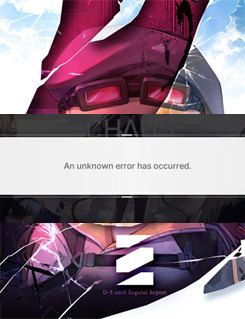
Well, this blog describes the best tricks to overcome the Chaos Zero Nightmare unknown error has occurred, and the major factors behind it. So, let’s get started…
To fix Android-related issues, we recommend this tool:
This effective tool can fix Android issues such as boot loop, black screen, bricked Android, etc. in no time. Just follow these 3 easy steps:
- Download this Android System Repair tool (for PC only) rated Excellent on Trustpilot.
- Launch the program and select brand, name, model, country/region, and carrier & click Next.
- Follow the on-screen instructions & wait for repair process to complete.
Why Does Zero Nightmare Keep Saying an Unexpected Error Occurred?
Check out the common causes that trigger this annoying error on an Android phone:
- Weak internet connection
- Chaos Zero Nightmare app cache or data conflicts
- Server-related outage or downtime
- Glitches in the Nightmare game app itself
- Device compatibility issues
- Insufficient storage space
- Outdated Chaos Zero Nightmare app version.
As you have known the major factors now, it’s time to proceed toward fixing it.
How to Fix Chaos Zero Nightmare Unknown Error Has Occurred on Android?
The entire sections cover the practically tested methods that have been verified successful in fixing this error. Check them out one by one until you eliminate the error message.
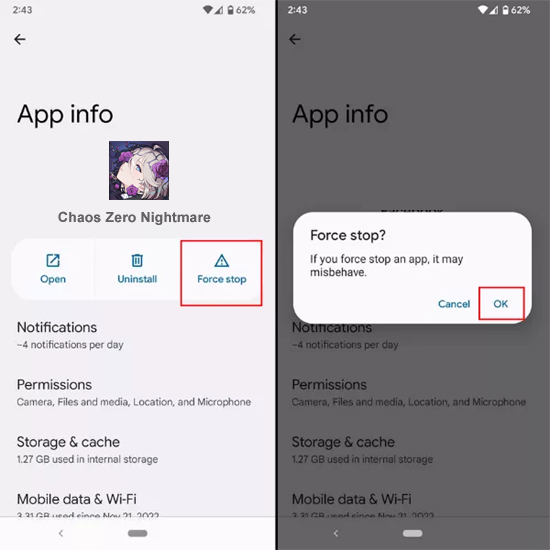
Solution 1- Force Stop & Relaunch Chaos Zero Nightmare App
Temporary issues on the Chaos Zero Nightmare app can prohibit it from working and display an unknown error has occurred. Therefore, force-closing the game app and relaunching it can fix the problem.
Here’s how you can do so:
- Go to the Chaos Zero Nightmare icon on your Home screen.
- Then, long hold the icon & select App info.
- After, tap on the Force stop.
Solution 2- Check The Network Connection
Due to a poor internet connection, it might be possible to encounter this warning message while opening the game app. To overcome this situation, it is vital to check the internet connection of your smartphone.
To do so:
- Enable & disable the mobile data.
- Turn OFF & ON the Airplane mode.
- Switch to a Wi-Fi connection if you are using mobile data or vice versa.
Also Read: Fixed: Chaos Zero Nightmare Not Working on Android [8 Ways]
Solution 3- Clear Game App Cache
Sometimes, the cluttered cache & data of the application could be the culprit behind an unknown error has occurred Chaos Zero Nightmare. So, consider clearing the app cache to solve the problem
Steps to be followed:
- Open Settings on your Android phone.
- Go to the Applications or Application Management

- Select the Chaos Zero Nightmare on the list & tap on the Storage Usage.
- Finally, tap on the Clear Cache & Clear Data.
Solution 4- Check Chaos Zero Nightmare Server
Remember that Chaos Zero Nightmare servers may experience irregular outages or maintenance periods, causing such errors.
In such situations, visit the official game site to check for the server problem. And if found under maintenance, wait for it to get solved.
Solution 5- Update Your Game
Outdated app versions may have bugs or compatibility problems. Thus, make sure to have the latest version of the Chaos Zero app installed on your Android device.
Follow the instructions below carefully to update the game:
- Go to the Play Store app on your phone.
- Next, tap on the Profile icon >> select Manage Apps and Device.

- Then, go to the Updates section & look for Chaos Zero Nightmare.
- If available, tap on the Update option to install the latest version.
Solution 6- Fix Chaos Zero Nightmare Unknown Error Has Occurred by Checking the Available Storage
Inadequate storage space on your mobile can lead to an unknown error. Ensure you’ve sufficient storage available for the game app downloads & updates. You can clear the needless files or uninstall unused applications to free up storage.
Here is how you can check the available storage:
- Go to the Settings on your phone.
- Next, tap on the About Phone.
- Tap on the option Storage.

- Check the space & delete the unnecessary files and apps to make the free space.
Solution 7- Re-install the App
If an unknown error has occurred Chaos Zero Nightmare persists, simply uninstall the game app and reinstall it.
Re-installing will fix your problem, and you will be able to open and play your game smoothly.
Frequently Asked Questions:
Chaos Zero Nightmare (CZN) is a deckbuilder RPG free-to-play gacha game, which can be played on Android, iOS, and PC platforms.
To fix Chaos Zero Nightmare on Android, try the below tips:
Most probably the Chaos Zero Nightmare game can be played in the STOVE PC Client.
Yes, the original Little Nightmares game is available on Android.
8GB TOTAL Size of Chaos Zero Nightmare app. What Kind of Game Is Chaos Zero Nightmare?
How to Fix Chaos Zero Nightmare on Android Mobile?
Where To Play Chaos Zero Nightmare?
Is Little Nightmares Available for Android?
How Much GB Is Chaos Zero Nightmare?
Summing Up
Well, Chaos Zero Nightmare unknown error has occurred seems very much irritating to gaming enthusiasts as it won’t let the users open and play the game. Nevertheless, with this guide, you’ll be easily able to fix this error and play the game on your Android phone without any interruption.
For any doubts or queries related to this topic, feel free to contact us on Twitter or Facebook.


James Leak is a technology expert and lives in New York. Previously, he was working on Symbian OS and was trying to solve many issues related to it. From childhood, he was very much interested in technology field and loves to write blogs related to Android and other OS. So he maintained that and currently, James is working for androiddata-recovery.com where he contribute several articles about errors/issues or data loss situation related to Android. He keeps daily updates on news or rumors or what is happening in this new technology world. Apart from blogging, he loves to travel, play games and reading books.