
A hotspot is an indispensable feature and a portable source of internet connectivity. However, there are times when this feature can trouble you, leaving you wondering why is my hotspot not working. So, today in this guide, we’re going to unravel this mystery and provide you the expert insights to get done with it.
To get your Android problems resolved, we recommend this tool:
This effective tool can fix Android issues such as boot loop, black screen, bricked Android, etc. in no time. Just follow these 3 easy steps:
- Download this Android System Repair tool (for PC only) rated Excellent on Trustpilot.
- Launch the program and select brand, name, model, country/region, and carrier & click Next.
- Follow the on-screen instructions & wait for repair process to complete.
Why Is My Hotspot Not Working? – Get the Solutions Here!
Solution 1: Restart Your Android Phone
Minor glitches on your device sometimes can trigger such problems. Restarting an Android phone fixes many issues, so begin with this simple trick first.
Follow the simple instructions here:
- Hold and press the Power button for a second unless you see the menu.
- Now, choose the Restart option and wait until it reboots.
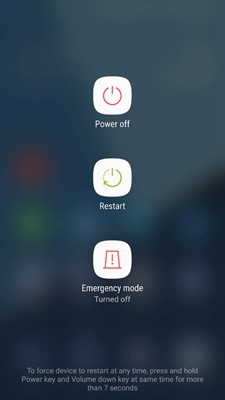
- When powered on, enable the hotspot to check if it is working fine this time.
Solution 2: Check if the Connected Device is Within Range
If the source device is not within the hotspot range or there is any object that is causing network interference, it leads your hotspot to malfunction. Ensure that the source device must be within the range and no electronic device obstruction is there in between.
Additionally, make sure to minimize the number of connections at a time for a smooth internet experience.
Also Read: Fixed: Authentication Error WiFi On Android [10 Ways]
Solution 3: Ensure that Mobile Data is Turned On
This is a simple thing but sometimes can cause such problems. It’s possible that you forgot to turn on mobile data which is why the hotspot is not working. So, check for this option once. Just access the shortcut menu, and see if the cellular data is enabled or not.
Also, check if you have reached the daily or monthly data limit on your phone or not. To share the internet, you must have enough data on your account.
Solution 4: Disable Battery Saving Mode
Insufficient battery levels or battery saver mode can hinder the hotspot from working and lead to unexpected shutdowns. Ensure that the Power saver mode is disabled on your phone.
Follow the steps here:
- Go to the Android Settings app.
- Navigate to the Battery section and select the Power saving mode option.
- Check if the option is disabled or not. If not, turn it off.

Solution 5: Reset Network Settings on Your Phone
Wrong network settings on your phone can also be the reason why isn’t my hotspot working. Resetting the network settings on your Android device can fix the issue.
- On your phone, go to the Settings app.
- Head to the Additional settings and select the Backup and Reset option.
- Click on the Reset phone and select Reset network settings.

Also Read: 15 Ways To Fix WiFi Keeps Disconnecting On Android 11
Solution 6: Install the Latest Android Software
In some cases, the outdated Android software can also be responsible for why won’t my hotspot work. Ensure that you use the updated software to avoid getting into such situations.
Follow the steps here to update Android:
- Open Settings on your phone and go to the Software Update section.
- Then, check for the available update.
- Now, tap the Download button to install the latest Android version.
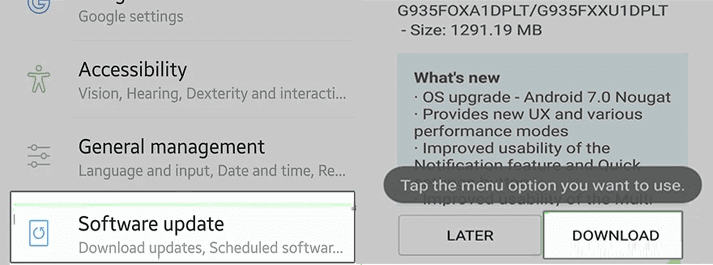
- Wait patiently until the update downloads and installs successfully.
Android Repair Tool – Troubleshoot Android Issues Effortlessly
Android Repair Tool is an easy and effective way to resolve Android system-related issues.
Using this advanced repair tool, you can fix several issues like OS crashing, apps not updating, black screen of death, bricked phone issues, and others.
Moreover, the software has wide compatibility and supports most Android phones. So, simply download the tool and fix any problem by following the instructions here.

Note: It is recommended to download and use the software on your PC or laptop only.
FAQs (Frequently Asked Questions)
How do I know if my hotspot is experiencing interference?
When the hotspot is experiencing interference, it fluctuates continuously or shows unusual connectivity drops. Look for electronic device interferences, physical objects obstacles, or multiple connected devices.
What role does network overload play in hotspot issues?
Multiple device connections at a time can overload the network and cause the internet to work slow, continuous fluctuations, and intermittent drop.
Can I troubleshoot hotspot issues without contacting customer support?
Absolutely, hotspot issues can easily be handled with simple troubleshooting like reconnecting, rebooting the client device, or placing the source device near to client device. However, if you are persistently facing problems with hotspot, in such contacting customer support would be best.
Conclusion
Now, that it is clear why is my hotspot not working, follow the troubleshooting tips mentioned in this article to resolve the issue and enjoy a seamless hotspot experience.

James Leak is a technology expert and lives in New York. Previously, he was working on Symbian OS and was trying to solve many issues related to it. From childhood, he was very much interested in technology field and loves to write blogs related to Android and other OS. So he maintained that and currently, James is working for androiddata-recovery.com where he contribute several articles about errors/issues or data loss situation related to Android. He keeps daily updates on news or rumors or what is happening in this new technology world. Apart from blogging, he loves to travel, play games and reading books.