
Have you lost access to your Google account and, with it, all your precious contacts? Well, do not worry, here in this post we’re going to show you how to recover contacts without Google account.
So, follow our lead and get your hands on your lost contacts again.

Why Google Account Matters for Contacts?
Google account is actually a central hub for various services, including your contacts. It offers a service called Google contacts where your contacts are stored, to be accessed whenever required. So, if you have synced your phone contacts with Google account, it is an essential requirement when it comes to recover contacts when lost or deleted.
Is It Possible to Recover Contacts without Google Account?
Losing access to your Google account can be a nightmare, but there are certain ways to restore your contacts even without it.
So Yes, if you have a reliable backup of contacts either on your PC or external storage devices such as SIM card or Pen dive, contact recovery is possible without Google account. Let’s see how.
How to Recover Contacts without Google Account?
Method 1: Use Local PC Backup to Restore Contacts
If you have manually transferred your contacts to PC, transfer the same to your phone to restore contacts without Google account.
Follow these detailed steps here:
- Connect your phone to your PC using USB cable.
- Now, click on the File Transfer option on the pop-up menu in your phone.
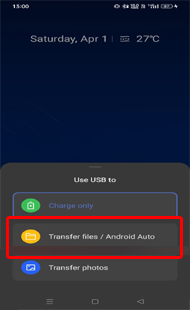
- On your PC, access the Backup contacts file on your PC.
- Lastly, check the contacts list and transfer the ones that you want to restore on your device.

Also Read: How to Restore Contacts on Android?
Method 2: Use SIM Card for Contacts Recovery without Google Account
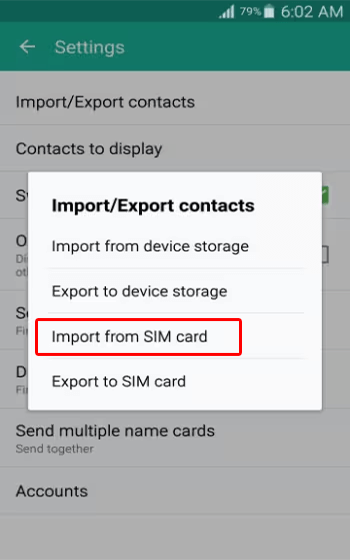
If you have stored your contacts on your SIM card, use the same for contacts recovery with no Google account required. Here’s what to do:
- Insert your SIM card on your phone.
- Now, open the Contacts app.
- Go to Settings>>Import/Export contacts>>and select Import from SIM card option.
Method 3: Consider 3rd Party Tool- Android Data RecoveryTool
Try recovering your contacts on your phone without Google account with Android Data Recovery Tool.
If you haven’t added or edited any contacts on your smartphone after the deletion, there’s a possibility to recover lost contacts using this tool by scanning the remaining traces.
Moreover, besides contacts, the software is capable of recovering other data as well including call logs, pictures, WhatsApp chats, text messages, videos, calendar, notes, and others.
So, get the software in your PC right now and to restore your deleted contacts on your phone by following the instructions here.
 btn_img
Note: It is recommended to download and use the software on your PC or laptop. It is because recovery of phone data on the phone itself is risky as you may end up losing all your data because of data overriding.
Also Read: How to Recover Contacts After Factory Reset?
Best Practices to Keep Your Contacts Safe
Prevention is always better than cure. So, follow the tips below to avoid contact loss in future.
- Try regularly backing up your phone contacts to a secure location, such as your PC. Also, you can use Android Backup & Restore software to save your contacts and other data.
- Sync your contacts with multiple accounts to ensure redundancy.
- Secure your Google account with a password manager to reduce the risk of losing access to it.
FAQs: Android Contact Recovery
Are 3rd party apps safe for contacts recovery?
Some 3rd party contact recovery apps are safe and reliable. However, it is essential to research and read the reviews before using them. Consider sticking to the well-known, reputable apps to minimize risks.
How to back up contacts for future security?
To back up your phone contacts, you can use your phone's in-built Local Backup feature, your Google account, or your PC storage.
What should I do if I lost access to my Google account?
If you lost access to your Google account, reach out to Google Support for further assistance.
Final Words
Contacts are a valuable part of our digital life, its essential to keep a backup of it to reduce data loss scenarios and tackle the unexpected circumstances.
However, with this guide, you can recover contacts without Google account whenever you want.

James Leak is a technology expert and lives in New York. Previously, he was working on Symbian OS and was trying to solve many issues related to it. From childhood, he was very much interested in technology field and loves to write blogs related to Android and other OS. So he maintained that and currently, James is working for androiddata-recovery.com where he contribute several articles about errors/issues or data loss situation related to Android. He keeps daily updates on news or rumors or what is happening in this new technology world. Apart from blogging, he loves to travel, play games and reading books.