
Minecraft, a virtual sandbox, offers endless possibilities. However, sudden disruptions like frequent crashes can mar your gaming experience. In this guide, we’re going to discuss why does Minecraft PE keep crashing, paving the way to resolve it with expert-guided solutions.
To Fix Minecraft Keeps Stopping Android Issue, we recommend this tool:
This effective tool can fix Android issues such as boot loop, black screen, bricked Android, etc. in no time. Just follow these 3 easy steps:
- Download this Android System Repair tool (for PC only) rated Excellent on Trustpilot.
- Launch the program and select brand, name, model, country/region, and carrier & click Next.
- Follow the on-screen instructions & wait for repair process to complete.
Why Does Minecraft PE Keep Crashing? Solutions Uncovered
Solution 1: Use Strong Internet Connection
Minecraft PE requires more than a normal bandwidth for smooth gameplay. Unstable or weak internet can impact your gameplay causing frequent crashes. Check your internet speed and strengthen it for a seamless and interruption-free multiplayer experience.
Use SpeedTest to test your internet speed and troubleshoot accordingly. If facing a problem with mobile data, turn on and off Airplane mode or switch to WiFi.
In case of a WiFi connection issue, keep the source device within range of the client device, avoid electronic-object interference, restart the router, or try re-establishing the connection.
Solution 2: Restart Your Android Phone
Minor software glitches or app bugs can trigger such issues. So, the very first solution that can help you fix the problem is simply restarting the device. Restarting has the power to tackle any small issues that occur on the phone.
Restart terminates all the running applications and refreshes the complete operation of your phone, resolving the temporary glitches including crashing.
Follow the steps below to do so:
- Hold down the Power button of your phone.
- Click the Restart option and wait for your device to reboot.
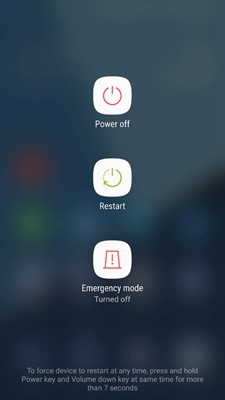
- Now, launch Minecraft PE and use it for a while to see if the crashing problem is resolved.
Solution 3: Check Your Device Specifications
Minecraft PE has minimum system requirements to be supported on Android. Inadequate or incompatible hardware can lead to app crash problems. Ensure that your device meets Minecraft’s specifications.
Here is the minimum system requirement of Minecraft PE for Android:
| OS | Android OS 8 or more |
| Graphics | OpenGL ES 3 or higher |
| Storage | 1 GB or higher |
| Memory | More than 1GB of RAM |
For detailed information on Minecraft PE system requirements check here.
Solution 4: Clear Your Device Storage
Insufficient storage often leads to app crash problems. Make sure you have enough storage on your device to support apps and their data like maps and game files.
So, check the storage and remove the unwanted apps or files from the device to make some space if needed.
To check storage, follow the below instructions:
- Open Settings on your phone and head to the About Phone section.
- Click on the Storage category and check the available space here.
- If required, delete some unnecessary files and apps to clear storage.

Solution 5: Clear Minecraft PE Cache
Accumulated cache on the Minecraft PE with time starts interfering with the app’s functioning causing Minecraft keeps stopping Android problem.
So, clearing the cache can help you eliminate all the temporary files and fix the problem. You just need to proceed with the following instructions:
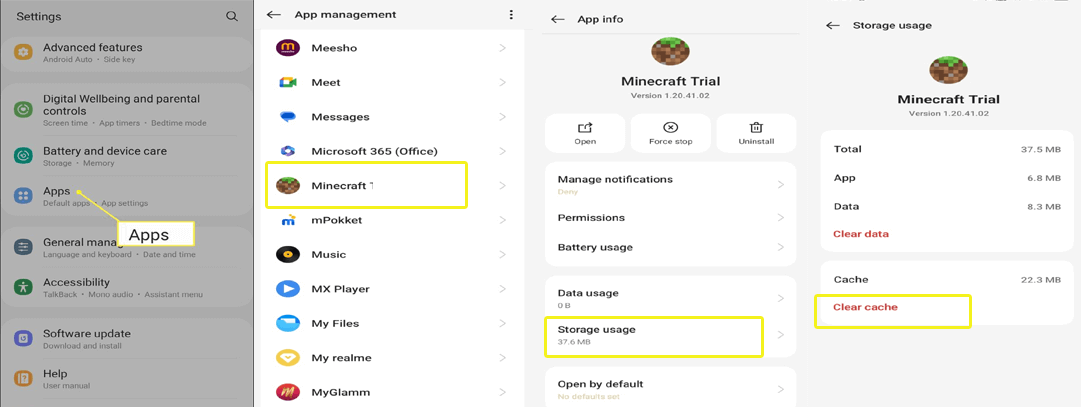
- On Settings, go to the Apps category.
- Select Minecraft PE from the app list.
- Then, click on the Storage Usage and Clear Cache option.
Solution 6: Uninstall Mods or Add-Ons
Mods or add-ons introduce complex game mechanics, additional features, or high-resolution textures, straining your device resources and causing Minecraft PE to crash, especially on less powerful or older devices.
So, be mindful of such mods and add-ons and uninstall them to have stability in the game. Also, consider lightweight mods and add-ons for better performance.
Solution 7: Install the Latest Minecraft PE Update
Outdated applications with time encounter compatibility issues and end up facing various issues including crashes. Therefore, developers launch regular updates to introduce the latest features and bug patches to optimize the game and enhance its performance.
So, keep an eye on the updates and install the ones whenever there is any update available. Here is how you can update the app:
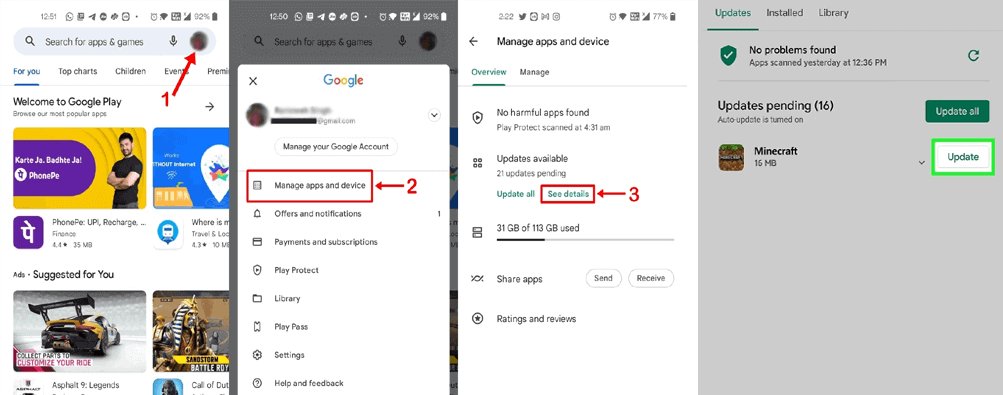
- On the Play Store app, go to your Profile.
- Then, head to the Manage Apps and Devices section.
- Click on the Updates Available option, and look for Minecraft PE update.
- Tap the Update button to install the version.
Solution 8: Update Your Android Device
If your Android version is outdated, it must be the reason why Minecraft isn’t responding Android. So, ensure that you use the updated software to address game-crash problems.
To update Android, follow the steps here:
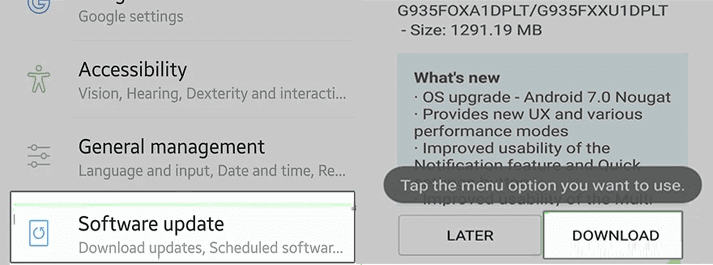
- Go to the Android Settings app, and head to the Software Update.
- Check the available update for the software.
- Install the update by hitting the Download button.
How to Prevent Overheating Issues on Android During Extended Gameplay?
Mobile gaming has nowadays become a ubiquitous part of our daily lives, providing both entertainment and experience. However, playing a resource-intensive game for an extended period might lead to overheating issues, pushing your Android phone to its limits.
So, learn how to fix Minecraft PE crash Android and manage overheating issues while extender gameplay.
- Consider playing a game that is compatible with your device.
- Manage background apps and processes.
- Configure graphics and other game settings according to your device specification.
- Manage storage on your device and clear the app cache regularly.
- Utilize gaming accessories such as cooling pads, and phone coolers that aid overheating.
- Maintain routine updates for both the game and the device to ensure optimal performance.
Advanced Solution: Fix Minecraft Keeps Stopping Android
When it comes to fixing any app-related issues on Android devices then it is highly recommended to go for Android Repair Tool. It is a professionally recommended software and has a 100% success rate.
With the help of this program, one can fix all sorts of Android app crashing/freezing issues, bricked phone problems, update failure errors, blue/black screen of death, OS crashes, and many more.
So, install the app on your system and get your app crashing problem fixed by following the simple user guide here.

Note: It is recommended to download and use the software on your PC or laptop only.
FAQs: Addressing Your Queries
Why does my Minecraft keep crashing mobile?
There are several reasons for Minecraft PE keep crashing Android. Common causes include slow internet, outdated app version, device glitch, incompatible device, corrupt cache or game files.
Will uninstalling Minecraft PE deletes my worlds?
Yes, uninstalling the Minecraft PE will delete your Worlds. So, before uninstalling it, you should save them on the cloud.
Does Minecraft crashing affect saved progress?
Well, crashes won't impact your saved progress. However, frequent crashes on the app may lead to data corruption, deleting your saved progress. So, regular backups are suggested.
Verdict
By understanding the intricacies of why does Minecraft PE keep crashing and implementing the suggested troubleshooting techniques, the Minecraft crashing Android problem can be resolved.
Also, follow the additional tips to enhance and optimize your gaming experience with seamless gameplay.

James Leak is a technology expert and lives in New York. Previously, he was working on Symbian OS and was trying to solve many issues related to it. From childhood, he was very much interested in technology field and loves to write blogs related to Android and other OS. So he maintained that and currently, James is working for androiddata-recovery.com where he contribute several articles about errors/issues or data loss situation related to Android. He keeps daily updates on news or rumors or what is happening in this new technology world. Apart from blogging, he loves to travel, play games and reading books.