
Texting is common, easy, and almost everyone does it! Whether it is friends or family, if you own a phone then you must be used to texting. But when you keep seeing Error 98 SMS Termination Denied when sending text on Android phone, it can get annoying.
This error occurs due to many reasons, such as incorrect SIM insertions or issues with your service provider. To know precisely what causes Error 98 SMS Termination Denied on Android and find out how to solve it, read on below.
Why Am I Getting Error 98 SMS Termination Denied Error on Android?
If you are repeatedly getting SMS Error code 98, it can be due to one of the following reasons.
- The service provider has temporarily ceased service due to maintenance or other issues.
- A glitch in your phone makes it unable to detect the SIM card.
- The phone model is outdated, and the parent company doesn’t support it anymore.
- A system update is pending, and the older version doesn’t work well.
- The SIM isn’t properly inserted in the SIM tray.
- The receiver’s number is incorrect or discontinued.
Also Read: Fix SIM Not Provisioned Error On Android
How To Solve Error 98 SMS Termination Denied?
Identifying the cause is essential to solve the Error 98 issue effectively in your Android phone. Now that you have analyzed the possible causes, you can try some of these troubleshooting methods to solve the problem.
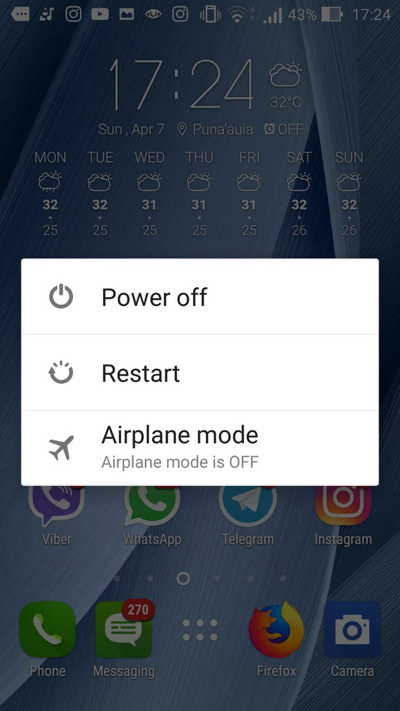
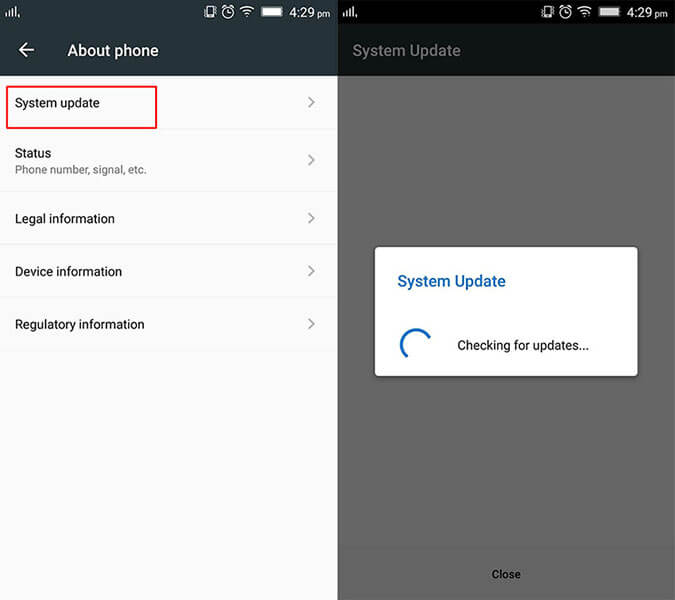
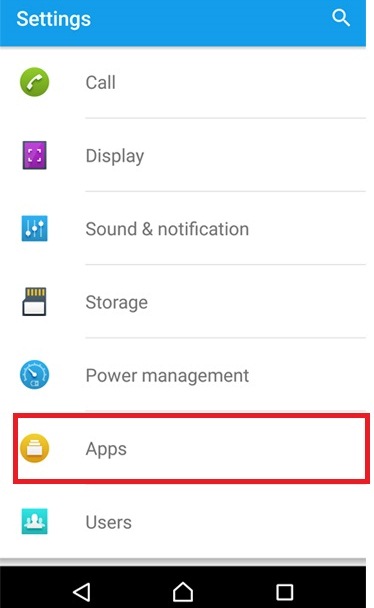
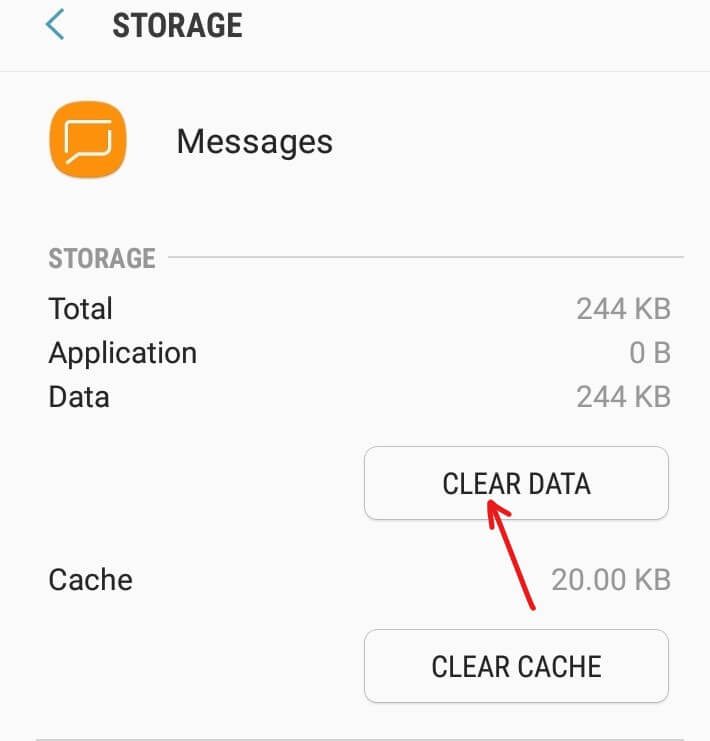
Most of the time, this issue can be solved by simply rebooting your phone. This solution works well if the error is caused due to a glitch or bug in the phone’s operating system. Press and hold the Power button of your device, and tap on the Restart option. Once your phone restarts, check if the issue exists by sending an SMS again. Older versions of Android often lack certain features that can cause Error code 98 when trying to send a text on Android. Many users found that updating to the latest version of Android solves this issue by itself. To check if your device has any pending updates, follow these steps: Improper SIM insertion can also be the cause of Error 98. When the SIM doesn’t correctly fit in the SIM tray, the phone can’t connect and detect the SIM. To avoid this, it is best to reinsert the SIM card through the below steps. Error 98 can also occur if your phone doesn’t have adequate balance to send the text message. Service providers usually charge a fee for text message services. Checking your credit and current plan can solve this issue if it is due to inadequate credit. To check your current balance: Sometimes Error 98 SMS Termination Denied on Android can occur due to an issue on the receiver’s end. Make sure that the receiving number actually exists. If you attempt to send a text message to a landline number, then you will see the Error 98 message. You can use a phone number validator app to verify whether the number belongs to a mobile phone or a landline. This problem also occurs if the receiver’s number has been discontinued. This can be due to numerous reasons like non-payment of bills or a number change. Though most carrier networks support splitting long text messages, some might not do so. If your text message exceeds the character limit and your service provider does not split it into multiple texts, then you will receive an error-98 text. To counter this problem, shorten your text message so that it is within the 160 character limit. Additionally, check with your service provider to see if they divide long messages into multiple shorter ones. Corrupt files and malware can also be a reason for Android Text Message Error Code 98. If you have recently installed a third-party app or connected your phone to an unknown device, then your files might be corrupted. To detect such files: Sometimes, Error 98 shows up if the message and call memory of your phone is full. Most phones retain that data unless it is manually deleted. To clear your message and call log: Also Read: Recover Deleted Text Messages On Android Similar to message history, the app also stores cache. Caches are temporary files that store data and help an app to load faster. When cache fails to load the correct information, your messaging app can display Error 98. To clear cache: The above solutions should fix Error 98 SMS Termination Denied on Android. If you have tried all the solutions and the problem still persists, contact your service provider or customer care. They can identify the root cause of this problem and suggest solutions accordingly. Additionally, they will also inform you if the Error 98 message is due to downtime or maintenance issues. Error 98 SMS termination Denied is a fairly common error while sending text messages through Android phones. Most of the time, it is due to a minor issue that can be easily addressed through one of the ten solutions discussed above. It will ensure that any problem with your phone is solved. If the error still appears, it is best to wait for a while and try again, as it might be due to a service outage by the carrier. James Leak is a technology expert and lives in New York. Previously, he was working on Symbian OS and was trying to solve many issues related to it. From childhood, he was very much interested in technology field and loves to write blogs related to Android and other OS. So he maintained that and currently, James is working for androiddata-recovery.com where he contribute several articles about errors/issues or data loss situation related to Android. He keeps daily updates on news or rumors or what is happening in this new technology world. Apart from blogging, he loves to travel, play games and reading books.
1: Restart Your Phone
2: Check for Android Updates
3: Reinsert The SIM Card
4: Check Current Balance
5: Check The Receiver’s Number
6: Restrict The Length Of The Message
7: Scan Your Phone For Corrupt Files
8: Delete Messages and Call Log
9: Clear Cache Of Messaging App
10: Contact Service Provider to Fix Error 98 SMS Termination Denied on Android
Conclusion
