
When your OPPO phone boots into recovery mode and gets stuck, it becomes unusable. You can’t get access to the apps, data, or even restart normally. It happens due to various reasons, including system crashes, corrupted cache, failed updates, or faulty buttons. Regardless of the reasons, it can be easily fixed by applying some quick fixes. This post covers the best solutions to solve OPPO stuck on recovery mode along with the major factors.
To fix Android-related issues, we recommend this tool:
This effective tool can fix Android issues such as boot loop, black screen, bricked Android, etc. in no time. Just follow these 3 easy steps:
- Download this Android System Repair tool (for PC only) rated Excellent on Trustpilot.
- Launch the program and select brand, name, model, country/region, and carrier & click Next.
- Follow the on-screen instructions & wait for repair process to complete.
Why is my OPPO Mobile Stuck in Recovery Mode?
There is a wide variety of reasons why your OPPO phone may freeze in recovery mode. Here are some of the major ones:
- Corrupted system files
- Failed software updates
- Faulty 3rd-party applications
- Manual button mispress
- Rooting or flashing gone wrong.
As you know, the common causes, it’s time to pick the right solution to troubleshoot it.
How to Fix OPPO Stuck on Recovery Issue?
Solution 1- Soft Reset the OPPO Device
The very first crucial step you can take is soft resetting the Oppo phone. To do so:
- Press & hold a Power + Volume Up
- Now, you have to wait until the OPPO logo displays.

- Release the buttons.
If this method fails, try the further solutions.
Also Read: Android Stuck in Fastboot Mode? Find Solutions to This Chaos!
Solution 2- Wipe the Cache Partition (Without Data Loss)
Many users have found this method useful in their cases to overcome this situation. Though this method cleans temporary or junk files that may block your system.
Here are the complete steps on how to exit recovery mode on OPPO mobile by wiping the cache partition.
- Use the Volume Down to choose Wipe Cache Partition.
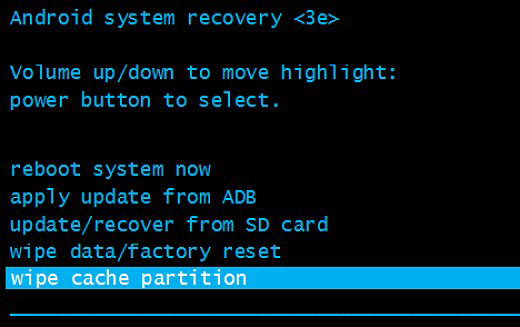
- Then, press Power to confirm.
- Choose the Reboot System Now.

Note: This method won’t delete your crucial files, but it can fix many system glitches.
Solution 3- Boot into Safe Mode (Check the Faulty Apps)
Sometimes, installing third-party applications can cause system conflicts. In such a situation, you can try booting your Oppo phone into safe mode to exit recovery mode on OPPO.
Follow the instructions below carefully:
- Power off your Oppo phone.
- Switch it on while holding a Volume Down
- Now, you will see the “Safe Mode” option at the screen’s bottom.
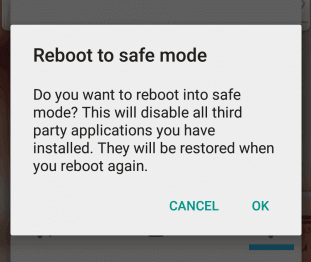
- Tap on it to confirm.
If the device boots normally, uninstall recently installed apps.
Solution 4- Try the MSM Download Tool
If you are an advanced user, then you can go with the OPPO’s firmware flashing tools. But be careful while using this tool.
Here is how can use it:
- Download the MSM Download Tool & your device firmware.
- Next, connect the phone through USB in EDL mode.
- Now, open the tool & flash the ROM.
Important: This process may erase your Oppo phone data. Back up if possible.
Also Read: Android Stuck in Recovery Mode: Unraveling the Mystery
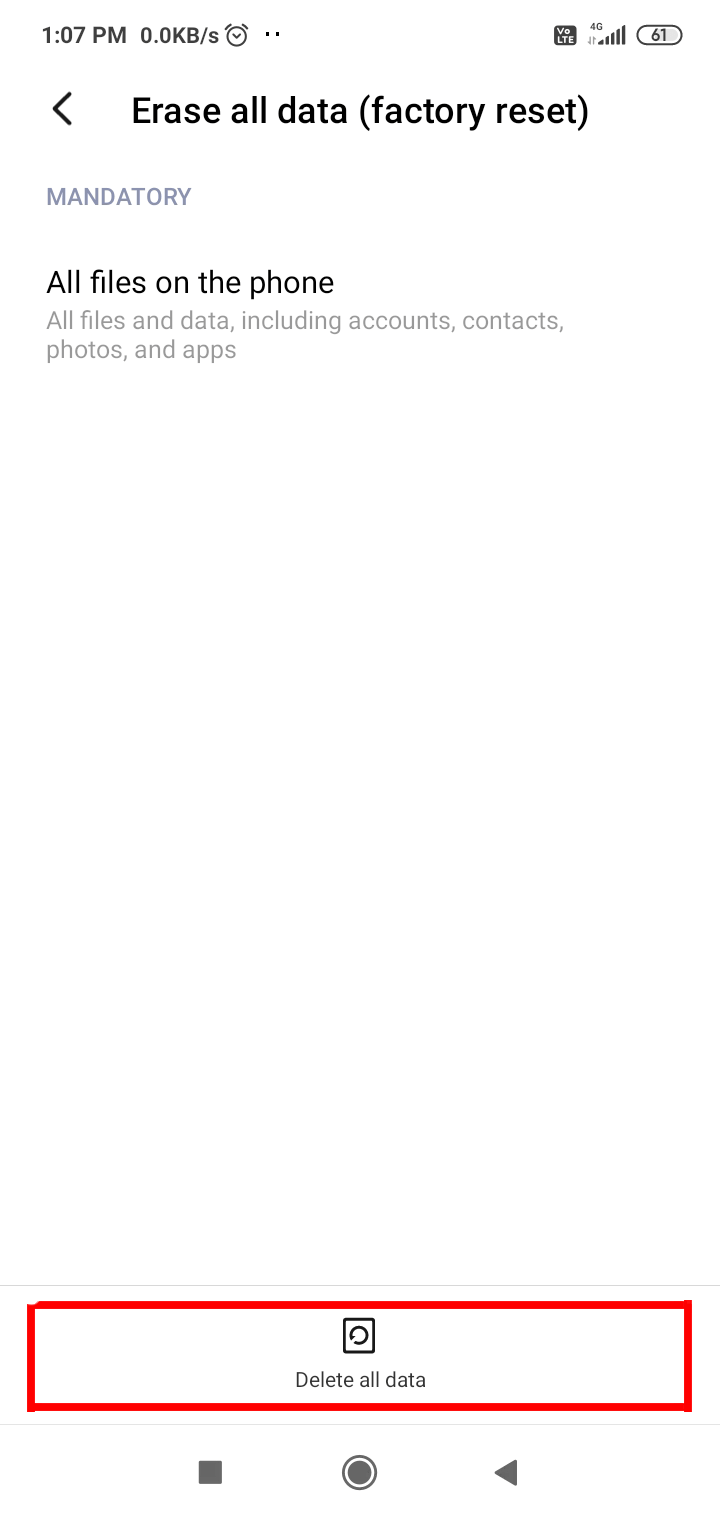
Solution 5- Perform a Hard Reset to Fix OPPO Stuck on Recovery Mode
Even after trying the above methods, if the problem persists, try hard resetting the device. It deletes all data.
Step 1: Go to the Settings >> tap on About phone
Step 2: Then, tap on Backup & Reset >> Erase All Data (Factory reset)
Step 3: Finally, tap Delete All Data option.
Android Repair Software: Solution to Every Android Issue
Android Repair is the best tool for fixing every Android error or issue. It can easily fix numerous problems, such as the app keeps crashing, system update failed, Android stuck in a boot loop, setting has stopped, Android settings have stopped, etc., with just a few clicks.
Besides, the software is 100% safe, easy to use, and compatible with all Android phone brands. Therefore, download and install this software on your PC and solve issues on your phone by following the steps here.

Note: It is recommended to download and use the software on your PC or laptop only.
How Can You Prevent Your OPPO Device from Getting Stuck Again?
Precaution is better than cure! It is important to follow some cautionary measures to avoid future issues in the Oppo smartphones:
- Keep your OS up to date
- Avoid installing unsafe applications
- Do not force firmware changes
- Reboot your mobile regularly
- Regularly clear your junk files.
Frequently Asked Questions:
What Does Recovery Mode Mean In OPPO?
Recovery Mode is a critical OS boot feature available on the OPPO phones running a ColorOS operating system.
Why Is My Oppo Phone Stuck on Logo?
An Oppo phone freeze on the logo or bootloop can be mainly triggered by software or hardware issues.
How Do I Fix a Stuck Recovery Mode?
To fix a stuck recovery mode by following the below steps:
- Firstly, hold down a Power button.
- Then, tap on the Volume Up with a Power button being held.
- On a recovery screen, you have to navigate using the Volume buttons.
- Now, proceed to Wipe Cache Partition >> press Power button.
How to Recover Data from Dead Oppo Phone Without Losing Data?
To recover data from a dead phone without losing data, try these tips:
- Use the OPPO Cloud or Google Drive.
- Recover Oppo Data Through Local Backup.
- Use Android Data Recovery Tool.
- Restore from Oppo Phone SD Card.
Bottom Line
Being stuck in recovery mode doesn’t mean your OPPO phone is dead or useless. You can easily tackle this situation by following the step-by-step methods specified in this post to revive it. Start simple, like a soft reset, and move toward advanced fixes only if needed.
With proper care and patience, you can fix OPPO stuck on recovery mode on your own.


James Leak is a technology expert and lives in New York. Previously, he was working on Symbian OS and was trying to solve many issues related to it. From childhood, he was very much interested in technology field and loves to write blogs related to Android and other OS. So he maintained that and currently, James is working for androiddata-recovery.com where he contribute several articles about errors/issues or data loss situation related to Android. He keeps daily updates on news or rumors or what is happening in this new technology world. Apart from blogging, he loves to travel, play games and reading books.