
Do the apps on Samsung Galaxy Note 9 keeps crashing? Here is the complete guide to fix Samsung Note 9 apps crashing or freezing problems.
Well, the app crashing problem is common and can be solved with a few simple solutions. So, continue reading the post further for complete information.
To fix Samsung Note 9 apps crashing, we recommend this tool:
This effective tool can fix Android issues such as boot loop, black screen, bricked Android, etc. in no time. Just follow these 3 easy steps:
- Download this Android System Repair tool (for PC only) rated Excellent on Trustpilot.
- Launch the program and select brand, name, model, country/region, and carrier & click Next.
- Follow the on-screen instructions & wait for repair process to complete.
Why Do the Apps on My Samsung Note 9 Keeps Crashing?
There can be numerous reasons behind apps crashing and freezing on Samsung Note 9. Some of the common reasons are:
- Outdated app version.
- Hardware issues.
- Outdated software version.
- Corrupt app cache data.
- Insufficient storage space.
How To Fix Samsung Note 9 Apps Crashing?
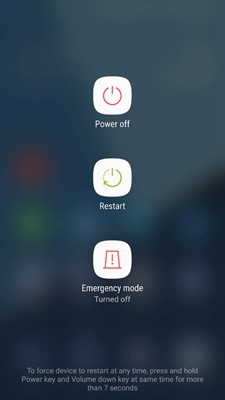
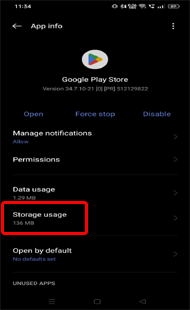
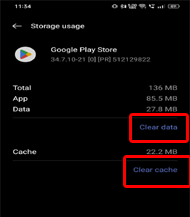
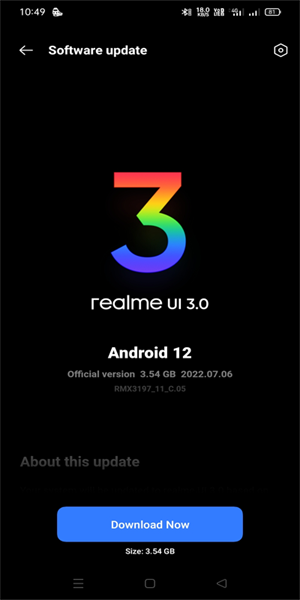
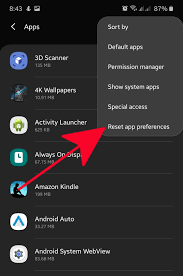
Sometimes simply restarting your device can help clear out any temporary issues causing apps to crash. So, here reboot your phone once. Here are the steps to follow: Another thing you can try is to clear the app cache and data to fix the app crashing problem on Samsung Note 9. This will remove any temporary data or corrupt files that may be causing the app to crash. Here’s what you need to do: Sometimes, the app’s internal glitch or its outdated version can also lead to a crashing problem. So, here reinstalling the app can help you deal with both cases by installing the updated version that includes the latest bug patches or features. Below are the instructions for reinstallation: Ensure your device is running the latest version of the Android operating system. Outdated software can become the reason why the apps keep crashing on Samsung Note 9. So, if you are not running on the latest software, follow the below steps to update it. If the configured app settings are wrongly set, you may come across an app crashing issue. So, here try resetting the app preferences to fix Samsung Galaxy Note 9 apps keep crashing. Here are the detailed steps to follow: If none of the solutions helped you fix the issue, try our professional Android Repair Tool to fix Samsung Note 9 apps crashing issue. This software is highly advanced and tremendously enormous in fixing Android-related problems. It can fix several errors and issues such as apps keep crashing, problem parsing the package error, Android system crashing, blue/black screen of death, and many more. It is 100 % safe and reliable. So, without any second thought, download this software on your system and get your problem fixed by following its user manual instructions. Key Features: Note: It is recommended to download and use the software on your PC or laptop only. I hope the blog helped you with enough solutions to deal with the Samsung Note 9 apps crashing problem. Now, try out the solutions as per step-by-step instructions and get rid of the app’s crashing problem on your Note 9 phone. If you have further queries or doubts, feel free to ask us on Twitter or Facebook. James Leak is a technology expert and lives in New York. Previously, he was working on Symbian OS and was trying to solve many issues related to it. From childhood, he was very much interested in technology field and loves to write blogs related to Android and other OS. So he maintained that and currently, James is working for androiddata-recovery.com where he contribute several articles about errors/issues or data loss situation related to Android. He keeps daily updates on news or rumors or what is happening in this new technology world. Apart from blogging, he loves to travel, play games and reading books.Solution 1: Reboot Your Phone
Solution 2: Clear App Cache & Data

Solution 3: Reinstall the App


Solution 4: Update the Software

Solution 5: Reset App Preferences

Recommended: Use Android Repair Tool to Fix Galaxy Note 9 Apps Keep Crashing Problem

Conclusion
