
In this article, I will show you how to fix Google Pixel 6 screen waking up randomly issue with 9 tried and tested fixes.
Google Pixel 6 is a newly launched smartphone that has grabbed the attention of numerous users who were looking for a powerful smartphone.
No doubt it has countless features but still many users are reporting about screen waking up issue on Google Pixel 6 especially Google Pixel 6 & 6 Pro users.
Thus, if you are currently going through the same problem, read this article till the end and fix this problem easily.
So, let’s get started…
How To Fix Google Pixel 6 Screen Waking Up Randomly Issue?
Check out the below simple tricks and troubleshoot random screen waking issues without any trouble.
Solution 1: Restart Your Google Pixel Phone
The very first method you should apply to fix this issue is to restart your Google Pixel 6 mobile. Rebooting the device will help you to eliminate the software-related problems and bring your device back to a fresh & healthy state.
In order to restart your Pixel 6 mobile, you need to press a Power & Volume up buttons at the same time. After that, you will get different options there, tap on the Restart option.
Solution 2: Fix Google Pixel 6 Screen Waking up Randomly by Removing Phone’s Case/Cover
Another simple trick which you could try to fix Google Pixel 6/Android screen wakes up randomly is to remove and check the device’s case/cover state. I am suggesting you to do so because it might possible that a case may be pushing that’s why the phone screen is waking up.
Simply remove your case/cover then check if the problem is fixed or not. If solve, then the case and cover was the actual reason behind the random screen waking issue on your device.
You May Also Read: 7 Ways To Fix Horizontal Lines On Android Phone Screen
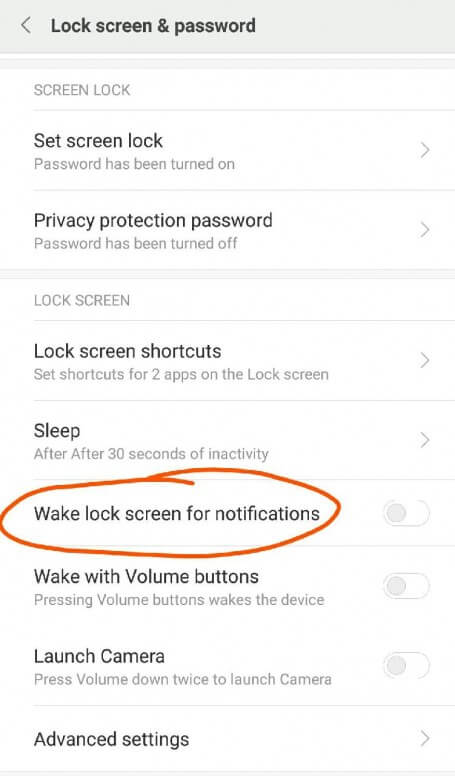
Solution 3: Disable Wake Lock Screen For Notifications
Many smartphone users have found disabling the ‘Wake screen for notifications’ feature helpful in their cases. So, you should also apply this method to tackle Google Pixel 6 or Android screen wakes up randomly problem.
In order to turn off the Wake screen for notifications, follow the below instructions carefully:
- At first, open the Settings.
- Next, you have to go to the Display.
- Click on the Lock screen.
- Here, you will get the toggle on the opposite side of Wake lock screen for notifications option. Just tap on it to disable it.
Solution 4: Check For The Software Update
Running an outdated version of Google Pixel 6 pro or any other smartphone OS can throw different issues on a device including the problem that you’re currently facing. So, there is a huge chance that the Google Pixel 6 screen waking up randomly due to the outdated version of the phone.
In such a case, you need to check for incomplete or pending updates on your mobile. For this, you need to try the below easy steps:
Step 1: From your Home screen, you need to find and select the Settings.
Step 2: Then, go to the System and tap on a System updates
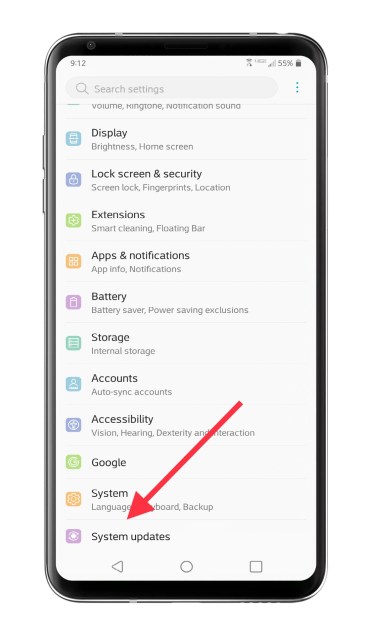
Step 3: Now, from the System update, click on the Check for update option.
Step 4: If prompted, then tap OK.
If there is any newest update available, simply download and install it on your device.
Solution 5: Disable The Fingerprint Unlocking
Nowadays, numerous smartphone users are using fingerprint lock to keep their devices safe and secure from unauthorized access.
Thus, if you’re also using the fingerprint lock rather than pattern or PIN lock and encountering this issue then it might possible that fingerprint lock is the root cause behind the screen waking up issue on Google Pixel 6.
In such a situation, you can disable a fingerprint locking feature on your phone and use other unlocking methods such as Pattern, PIN, or Password.
After doing so, check if the problem is solved or not, if not then proceed towards the next solution.
You May Also Read: How To Fix Ghost Touch Issue On Android [10 Methods]
Solution 6: Check the NFC Settings & Debit Cards
Most of the smartphone users used to keep their debit or credit cards inside the back cover of the phone & have activated NFC settings. Though, this could be the reason for Google Pixel 6 screen wakes up automatically problem.
So, if you are doing the same thing and your phone screen wakes up randomly, maybe the NFC setting is enabled that’s why your mobile is attempting to read your card & make the connection.
Hence, simply remove your and disable the NFC settings on your Google Pixel 6.
Solution 7: Boot Google Pixel 6 Phone In Safe Mode
There is a huge possibility that due to some third-party apps, you can receive different errors or bugs including screen wakes up randomly after Android 12 update.
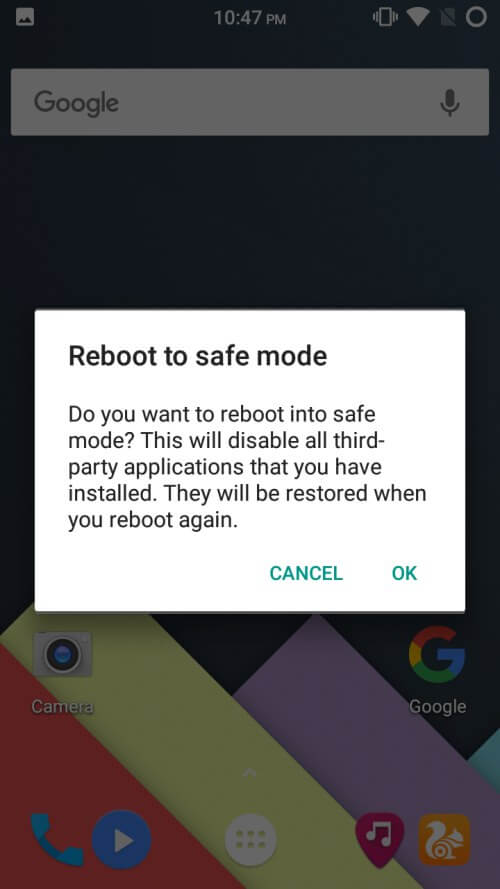
Therefore, you can boot your Android or Google Pixel device in a safe mode to get rid of the problem. Booting the device in a safe mode will not only solve this issue but also makes your smartphone run smoothly.
Here is how you can boot your phone in safe mode:
- At first, press & hold the Power button
- Here, you will see menu option, just press & hold the Power off
- Now, you’ll be asked if you need to reboot your device in a safe mode.
- At this time, click on the OK. Now, Safe mode will appear in the left side corner of your phone’s screen.
Solution 8: Turn Off Ambient Display
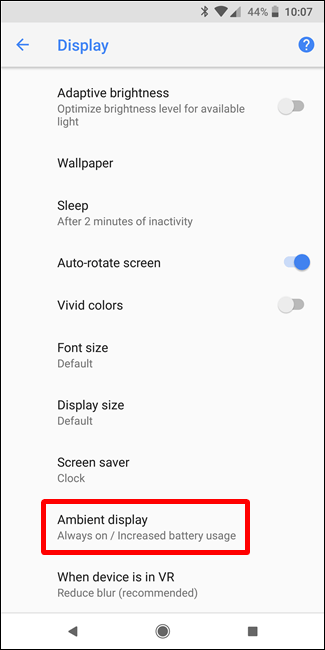
If the above-specified solutions failed to fix Google Pixel 6 screen waking up randomly issue then one more option left for you is to disable the Ambient Display.
In order to disable or turn off the Ambient Display feature, follow the beneath steps:
- On your Google Pixel 6 device, you have to go to the Settings.
- Then, scroll down and find “Display” entry and tap on that.
- Now, a little bit downward this menu, you will get the “Ambient Display” toggle. Just tap on the slider in order to disable it.
Solution 9: Visit Nearby Repair Center To Fix Random Screen Waking Issue
Last but not the least, if the above DIY methods failed to solve this problem, the last option left for you is to visit the repair center.
There is a possibility that because of a faulty or damaged hardware component you’re encountering a Google Pixel 6 screen waking up randomly problem. So, it should be solved ASAP.
Just take your smartphone to a nearby repair center and ask them to help you. Because if there are any hardware issues, it can be only fixed by experts and then will suggest to you what to do and what not to do.
Recommended Solution To Fix Android Errors & Issues
Encountering errors or bugs while accessing Android devices is not a new thing for users. There are several problems that users are facing in their daily life.
Thus, if you are currently getting any error or issue on your Android phone then don’t worry here’s the perfect solution for you that is Android Repair Tool.
It is one of the best-rated programs that professionals are recommending when it comes to solving Android-related issues like apps keep crashing, phones stuck in a boot loop, screen flickering, black screen or white screen error, etc.
Now, what are you waiting for? Just download and install this tool on your PC and go through its user guide.

Note: It is recommended to download and use the software on your PC or laptop only.
Final Verdict
So, this is all about how to solve Google Pixel 6/6 pro screen waking up randomly issue. All the possible methods and workarounds are very effective and can be applied even without any tech skills.
Therefore, try them once and tackle the situation by yourself.
However, if you are unable to troubleshoot screen wakes up automatically on Pixel 6 Pro using the above 8 DIY tips, then simply visit the nearby repair center and ask the experts for help.
Hopefully, you found this troubleshooting guide useful for you.

James Leak is a technology expert and lives in New York. Previously, he was working on Symbian OS and was trying to solve many issues related to it. From childhood, he was very much interested in technology field and loves to write blogs related to Android and other OS. So he maintained that and currently, James is working for androiddata-recovery.com where he contribute several articles about errors/issues or data loss situation related to Android. He keeps daily updates on news or rumors or what is happening in this new technology world. Apart from blogging, he loves to travel, play games and reading books.